Printable Cryptograms
A free cryptogram maker: paste a sentence, print a page of cipher text with a ruled line to write each letter on, and keep the answer page, which prints your sentence and the full letter key. No login, no cap, and an optional seed that rebuilds the same cipher later.
Nothing to print yet. Go back to the page, type a sentence, and press Make cryptogram. Print again and you will get the cipher page, followed by the answer page.
Your cryptogram
Both pages are drawn at print resolution, so the letters stay solid on paper.
What this cryptogram maker does with your sentence
A cryptogram is a sentence rewritten with a substitution cipher: every letter of the alphabet is swapped for one other letter, and the swap stays the same from the first word to the last. If A is written as Z at the start of the sentence, it is written as Z everywhere. The solver's job is to work out the twenty-six swaps and read what you wrote.
This maker builds that swap table at random, then applies it. You type a sentence, press the button, and two pages come out:
- The puzzle page carries only the cipher text, with a faint ruled line under each row for writing the guessed letters on. No key, no hint letters, nothing that gives it away.
- The answer page carries your original sentence in plain text, plus the whole letter key along the bottom — all twenty-six pairs, printed as
A=Z B=A C=Land so on.
Every character outside A to Z is left exactly as you typed it, which turns out to matter a great deal for how hard the puzzle feels. That is the next section, and it is the part most cryptogram tools never mention.
No letter is ever encrypted as itself
The swap table is a random shuffle of the alphabet, and a shuffle can happen to leave a letter where it started. This maker checks for that and fixes it before drawing anything: if a letter would stand for itself, it is exchanged with the next letter along.
We did not take that on faith. Two runs of two thousand puzzles each — one feeding the alphabet in as the sentence, one using ordinary English sentences — produced zero cases of a letter encrypting to itself, out of four thousand puzzles.
Why it is worth knowing: it means every letter on the printed page is genuinely changed. A solver who wonders "could this Q just be a Q?" is always wrong, and you never hand out a puzzle with one letter sitting there in plain sight. It is a property of this generator rather than a rule about cryptograms in general — a hand-made cipher or another tool can leave a letter fixed.
What the cipher leaves alone is your difficulty dial
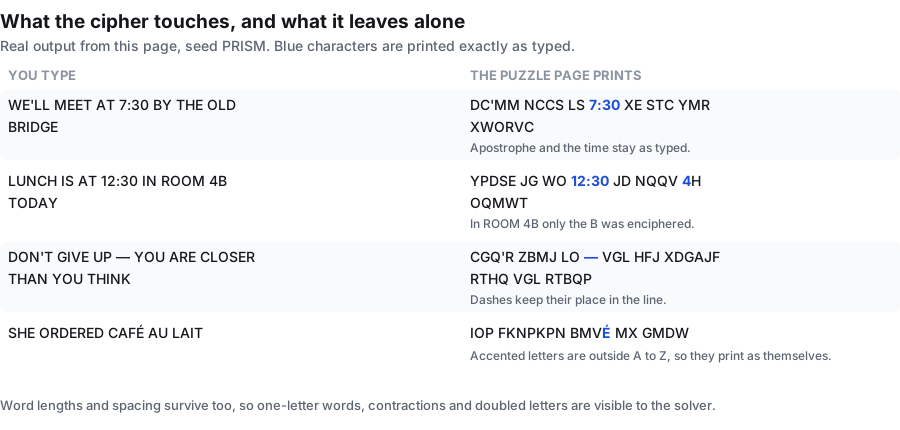
Only the characters A to Z are replaced. Everything else you type — spaces, apostrophes, hyphens, dashes, colons, digits, and letters with accents — is printed unchanged, because it falls outside the alphabet the cipher works on. Here is what that looks like with real output from this page, all with the seed PRISM:
WE'LL MEET AT 7:30 BY THE OLD BRIDGE → DC'MM NCCS LS 7:30 XE STC YMR
LUNCH IS AT 12:30 IN ROOM 4B TODAY → YPDSE JG WO 12:30 JD NQQV 4H OQMWT
DON'T GIVE UP — YOU ARE CLOSER THAN YOU THINK → CGQ'R ZBMJ LO — VGL HFJ XDGAJF
SHE ORDERED CAFÉ AU LAIT → IOP FKNPKPN BMVÉ MX GMDW
Look at what survived: the apostrophe in DC'MM, the whole time 7:30, the 4 in room 4B, the em dash, and the accented É, which is not in A to Z and so prints as itself. Word lengths and spacing survive too.
Those leftovers are free clues, and they are the only difficulty control this page has. Nothing else about the cipher is adjustable — there is no easy, medium or hard switch. So:
- To make it easier, pick a sentence with short common words, a contraction, a doubled letter or a one-letter word. Each of those hands the solver a shape to start from.
- To make it harder, pick a sentence of long, uncommon words with no numbers, no apostrophes and no repeated letters. The solver gets nothing but the letters themselves.
The trade-off is honest, and it is worth stating: because spacing and punctuation survive, a cryptogram is never as sealed as a cipher that strips them out. If you are encoding something you genuinely do not want read from its shape, this page is a puzzle, not encryption.
Line width, font size, and how much fits on the page
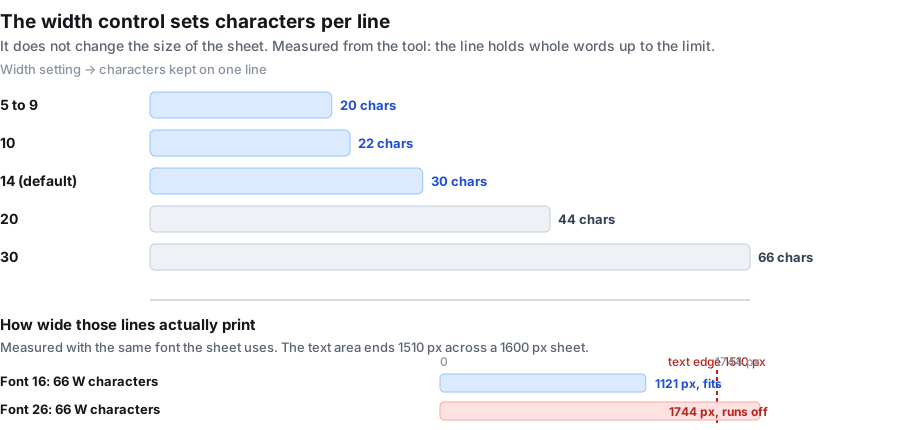
The width control does not change the size of the sheet — the page is always the same page, 1600 by 2072 pixels, printed to fill a US Letter sheet. What it changes is how many characters the tool packs onto one line before starting a new one. It keeps whole words, so a line can end a little short.
| Width setting | Characters kept on one line | What it looks like |
|---|---|---|
| 5 to 9 | 20 | Narrow column, short lines, lots of them |
| 10 | 22 | Narrow column |
| 14 (the default) | 30 | The everyday setting |
| 20 | 44 | Wide lines |
| 30 | 66 | One long line across the sheet |
Width and font size together decide whether a line stays on the paper. These are measured with the same font the sheet draws in, not estimated. The text area runs from 90 px to 1510 px across a 1600 px sheet.
| Line | At font 16 (drawn 18 px) | At font 26 (drawn 28 px) |
|---|---|---|
| 30 characters, all W | 509.7 px | 792.8 px |
| 66 characters, ordinary capitals | 707.0 px | 1099.8 px |
| 66 characters, all W (the widest letter) | 1121.3 px — fits | 1744.2 px — runs off the sheet |
Two limits worth knowing before you paste a long quote.
The sentence is cut at 200 characters. We fed the tool 201, 240 and 400 characters; each time it printed exactly the first 200 and said nothing about the rest. There is no warning, so count before you paste, or shorten the quote yourself.
A very wide line at the largest font can run off the page. At font 26 with the width at 30, a line made entirely of wide letters such as W measures 1744 px and the sheet is 1600 px wide, so the end of it is lost. Ordinary text is fine at 1099.8 px. Drop the font size or the width setting if your line is built from wide letters.
Vertically there is room to spare. At font 18 or below the rows are 42 px apart and 40 rows fit above the footer; at font 26 they are 50 px apart and 34 rows fit. The most extreme sentence we could build — 199 characters made of one-letter words, at the narrowest width and font 26 — filled 10 rows, with the last one drawn 700 px down the sheet, nowhere near the key line at 1912 px.
The seed: rebuild the same cipher later
Left blank, every press of the button builds a fresh swap table. Filled in, the cipher is pinned: type anything into the seed box — a date, a class code, a worksheet number — and the same seed with the same sentence produces the same cipher every time.
Same seed plus same sentence produces the same cryptogram. Something like yr5-week2 is enough.
Three honest limits on that promise, all of them checked rather than assumed:
- The sentence is part of the recipe too. Change one word with the same seed and you get a different cipher, not a lightly edited version of the old one. Both have to match.
- The answer page's text is not affected by the seed. The answer page prints your own sentence, so that part is the same whatever the seed is. Only the letter key along the bottom changes. That is the opposite of the maze generator, where pinning the seed pins the answer route as well.
- A blank seed is genuinely random. Press twice with the box empty and you get two different ciphers. If you liked one and did not write the seed down, it is gone — there is no history to scroll back through.
What it is for: write the seed next to the worksheet title in your plan book, and you can rebuild the exact same cipher page and answer page next term without keeping the printout.
The two pages, and what is on each
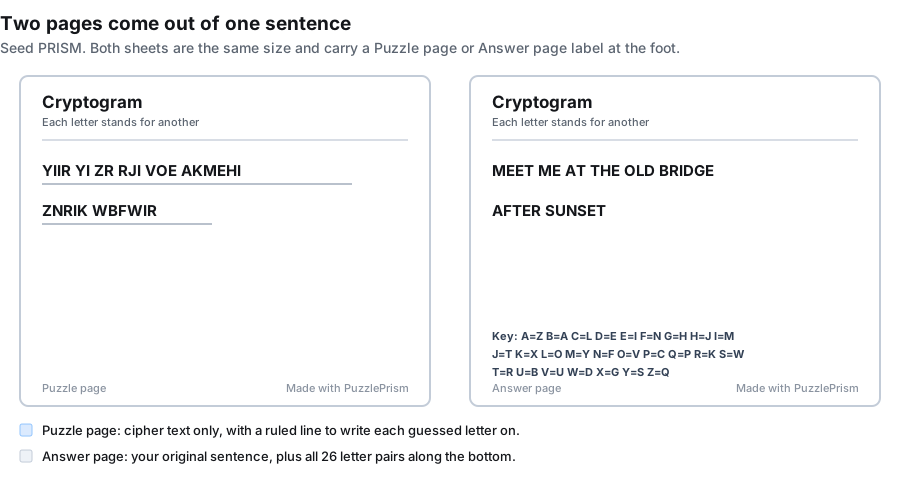
The puzzle page prints the cipher text and nothing else that helps: no revealed letters, no frequency table, no title that gives the source away. Under each row there is a ruled line to write the guessed letters on — drawn 8 px below the text baseline, which on paper is a comfortable gap for a pencil.
The answer page prints your sentence in plain text, in the same line breaks as the puzzle page, and then the full key along the bottom: twenty-six pairs in one line, set at 22 px bold. That line measures 1480.6 px and ends 1570.6 px across the 1600 px sheet, so it does fit — but it runs into the right margin rather than stopping where the text column stops.
How to solve a cryptogram
You do not need the key, and you do not need to guess. The method is pattern work, and it goes fastest starting from the shortest words:
- One-letter words first. In English a single-letter word is almost always A or I. That places two letters immediately.
- Then the two- and three-letter words. OF, TO, IS, IT, and THE and AND are the patterns to look for. A three-letter word that appears several times is very often THE.
- Use what the cipher left alone. A word with an apostrophe is a contraction, so the letter after the apostrophe is probably S, T, D, L or M. A doubled letter in the middle of a word narrows the field to the common doublings.
- Count the letters. The most frequent letter in English writing is E. Whichever cipher letter turns up most often across the whole sentence is a good first guess for it.
- Follow each guess through the whole page. The swap is consistent, so one confirmed letter fills itself in everywhere it appears. That is what turns a few guesses into the whole sentence.
When somebody gets properly stuck, the answer page is the way out: switch to the Answer page tab to read the sentence, or read one pair off the key line at the bottom.
What this cryptogram maker does not do
Being clear about the edges saves you hunting for a control that is not there. Compared with the cryptogram tools that rank around it, this page deliberately leaves out:
- No number cipher and no symbol cipher. Letters are replaced by letters. A digit you type stays that digit, and there is no mode that writes the sentence as numbers or as pictures.
- No difficulty levels and no revealed starting letters. Some tools offer easy, medium and hard by giving away one or three letters up front. There is no such control here — difficulty comes from the sentence you choose, as described above.
- No solving on screen. There is no box to type guesses into, no timer, no check-as-you-go and no score. This is a print-and-write tool.
- No built-in quote library. You bring the sentence. There is no random-quote button and no theme generator, which also means nothing here decides the content of your puzzle for you.
- No share link or saved library. Nothing is stored, so there is no URL to send somebody. Print the page, or download the PNG or PDF and send the file.
- No batch mode. One cryptogram per press. For a class set, press the button once per sheet — with the seed box left blank each one will be different.
- No commercial licence document. There is no account, no paywall and no watermark on the output, but the site does not issue a written licence either. If you need a signed commercial-use document for a puzzle book, this is not the place to get one.
If one of those is the thing you need, a specialised cryptogram tool will serve you better. What is here is one cipher type, described exactly, with the answer page included.
Cryptogram, cipher, code: which one you landed on
The three words get used as if they meant the same thing. A cipher is the rule that swaps the letters; a cryptogram is the puzzle you get after applying it; a code in the strict sense works on whole words or phrases rather than single letters. Everything on this page is the middle one.
The word also turns up somewhere unrelated, and it is worth saying so because people arrive here looking for it: search suggestions for cryptogram include questions about what a cryptogram is on a credit card, in payments and in biology. Those are different meanings of the same word — a security value carried on a payment card, for instance — and this page is about the letter puzzle. If you came from a payments or biology question, the letter puzzle is not the answer you were looking for.
Within puzzles, the nearest neighbours on this site are all word puzzles with a different shape. The fallen phrase puzzle also starts from one sentence, but it leaves every letter as itself and drops whole columns instead — which is why the spacing and punctuation survive here and do not survive there. The word scramble generator mixes the letters inside each word instead of swapping the alphabet. The word search generator hides words in a grid of letters. The criss-cross puzzle maker crosses whole words in a grid and prints them without any clues at all. And the word puzzle maker page gathers the word-list types together, while the word puzzle generator page is the one to read if getting the identical sheet back later matters to you.
Nothing you type leaves the browser
There is no upload step because there is no upload. The whole maker is script running in this tab: no request is sent, nothing is written to storage, and there is no account for anything to be attached to. Close the tab and the sentence you typed is gone.
Two consequences worth knowing. Once the page has loaded you can drop off the network and keep making cryptograms, which helps on a locked-down school network or a patchy connection. And a sentence you would rather not put on somebody else's machine — a surprise, an inside joke, a proposal — never sits on one.
Printing and exporting
Everything is black text on white, with no background fill to eat toner. Three ways out:
- PNG downloads the sheet at full pixel size, 1600 by 2072, which is handy for dropping the cryptogram into a worksheet document or a slide.
- PDF writes a US Letter page, 612 by 792 points, with the sheet fitted inside half-inch margins.
- Print sends the page you are looking at to your printer. Switch to the Answer page tab first if you want the solved sentence and the key on paper as well.
Both pages are drawn at print resolution, so the letters do not break up into grey when they land on paper. Printing in black and white is the default rather than a setting to hunt for.
The other puzzles built into the same generator
The same page can build eleven puzzle types; this page simply has the cryptogram selected. These are all of them:
Frequently asked questions
What is a cryptogram?
A sentence rewritten so that every letter of the alphabet stands for one other letter, consistently throughout. The solver works the swaps out from the pattern of the words and reads the original message. This page makes one from a sentence you supply and prints it with a matching answer page.
Is this cryptogram maker free?
Yes, and there is nothing to unlock. No account, no credits, no monthly limit on how many cryptograms you make, and no watermark on the printed page.
Do I have to sign up?
No. There is no login anywhere on this page. Open it, type a sentence, press the button. Nothing is saved for you, because nothing is saved anywhere.
How does a cryptogram work?
The tool shuffles the alphabet into a swap table, then replaces every A to Z character in your sentence according to that table. The same letter always becomes the same substitute, which is what makes the puzzle solvable: repeated letters, word lengths and common word patterns are the way in.
How do I make a cryptogram?
Type or paste a sentence into the box, choose a line width and font size, and press Make cryptogram. You get the cipher page first; switch to the Answer page tab for your original sentence and the letter key. Print or download either page.
How do you solve a cryptogram step by step?
Start with the one-letter words, because in English those are almost always A or I. Move to short common words such as THE and AND. Use the apostrophes and doubled letters the cipher did not touch. Then count letters: whichever cipher letter appears most often across the whole sentence is a good first guess for E. Each confirmed letter fills itself in everywhere on the page.
Does the cryptogram come with an answer key?
Yes, on the answer page. It prints your original sentence in plain text plus all twenty-six letter pairs along the bottom, so you can check a finished puzzle or give one letter away if somebody is stuck.
Can I make a cryptogram with symbols instead of letters?
No. This maker replaces letters with letters. There is no symbol mode, and no setting that draws a picture per letter. If you type a digit or a punctuation mark it prints as itself, unchanged.
Can I make a cryptogram with numbers?
Not in the sense of a number cipher, where each letter becomes a digit. Only A to Z is enciphered, and any digits already in your sentence stay exactly as you typed them — 7:30 stays 7:30, and in ROOM 4B only the B changes.
Can I make cryptograms for kids?
Yes, by choosing the sentence carefully. Short sentences with common words, a contraction or a doubled letter give young solvers somewhere to start. There is no difficulty switch and no way to reveal a starting letter, so the sentence itself is the only control you have.
What is the longest sentence I can use?
200 characters. Anything past that is dropped without a warning: we tried 201, 240 and 400 characters and the printed page stopped at exactly 200 each time. Count before you paste, or split a long quote into two puzzles.
Can I use punctuation, numbers and capital letters?
Yes. Punctuation, digits and spacing print exactly as you typed them, and the whole sentence is set in capitals whichever way you type it. Only A to Z is enciphered, which also means an accented letter such as É prints as itself.
Can I get the same cryptogram again later?
Yes. Fill in the seed box before you press the button and write the seed down. The same seed with the same sentence rebuilds the same cipher and the same key. Change the sentence and you get a different cipher even with the same seed.
Does the seed change the answer page?
Not the sentence on it. The answer page prints your own sentence, so that part is identical whatever the seed is. The letter key along the bottom does change, because the key is the cipher.
What happens if I leave the seed blank?
Every press builds a fresh swap table, so no two cryptograms come out the same. That is what most people want. It also means a cipher you liked is not recoverable — there is no history to go back through.
Is every cryptogram solvable?
Yes. The cipher is generated by swapping letters, so your sentence can always be recovered, and the answer page always has both the sentence and the full key to prove it.
Does a letter ever stand for itself?
Not here. The generator checks the swap table and exchanges any letter that would map to itself. We ran four thousand puzzles to confirm it: none of them contained a letter that encrypted to itself.
Can I solve the cryptogram on screen?
No. This is a print-and-write tool. There is no box to type guesses into, no check-as-you-go, no timer and no score. Print the puzzle page or download it, and write the letters in by hand.
Does this need wifi to work?
It needs a connection to load the page the first time. After that it runs entirely in the tab, so you can go offline and keep making cryptograms. Nothing is uploaded at any point.
Can I make several cryptograms at once?
No. One cryptogram per press, one page per puzzle. For a set of thirty, press the button thirty times and print each sheet — with the seed box left blank every one will be different.
Does it work on a phone?
Yes. The controls stack into one column on a narrow screen and the sheet scales to fit. Use the browser's share or print menu for output.
Why does the end of my sentence look cut off?
Either you passed 200 characters, which the tool trims silently, or your line is wider than the sheet. At font 26 with the width set to 30, a line made entirely of wide letters such as W measures 1744 px against a 1600 px sheet and the end of it is lost. Lower the font size or the width setting.
What is a cryptogram on a credit card?
A different meaning of the same word. In card payments a cryptogram is a security value generated for a transaction, which has nothing to do with letter puzzles. The word also turns up in biology. This page is about the puzzle: a sentence enciphered letter by letter.
Can I make printable cryptograms for kids?
Yes, but the difficulty is controlled entirely by the sentence you choose. Short sentences with common words, a contraction or a doubled letter give young solvers somewhere to start. There is no difficulty switch and no way to reveal a starting letter, so pick the sentence carefully — something like THE CAT SAT ON THE MAT is much easier than a long proper name or a technical phrase.
Can I get a printable cryptogram PDF?
Yes. After you generate the puzzle, switch to the Answer page tab and use Download PDF. It gives you a single US Letter page with your original sentence and the full twenty-six letter key, which you can email, save on a drive, or take to a copy shop. The puzzle page has the same PDF option if you want to hand out just the cipher.
How is a printable cryptogram different from an online cryptogram?
This page makes printable cryptograms — it draws both the puzzle page and the answer page and hands them to you as a file. An online cryptogram you solve inside the browser, usually with boxes to type letters into and sometimes with a score or timer. This tool does neither of those; it produces paper you print and write on by hand.