Word Search Generator
A free word search maker: paste your words, set the grid, and get a printable puzzle page plus its answer page. No login, no signup.
Nothing to print yet. Go back to the page, paste your word list, choose a puzzle type, and press Generate puzzle. Print again and you will get the puzzle page, followed by its answer page.
Your puzzle
Both pages are drawn at print resolution, so the grid lines stay solid on paper.
What you get from this word search generator
Two finished pages, built from the same layout. The puzzle page carries the letter grid with the word bank underneath it. The answer page carries the same grid with every hidden word traced over it, and the same word bank struck through. Because both are drawn on one sheet size, the answer page registers with the puzzle page when you print them back to back.
This page is a word search generator, a word search maker and a word search creator in the same sense — three names people search for, one tool. There is no free tier and paid tier here: no account, no trial counter, no cap on how many puzzles you make.
Why this page is the word search maker you were looking for
People type "word search maker", "word search generator" and "word search creator" expecting three different tools. They are the same tool here. You paste a list, the page draws the grid, and you leave with a puzzle page and its answer page — no account, no watermark, no per-puzzle charge. The puzzle is yours to print, hand out, or drop into a worksheet.
The parts that decide whether a word search is any good are the ones this maker puts in your hands: the grid size, the four directions words can run, the font size for low-vision solvers, and a seed so a puzzle you print today can be rebuilt exactly next term. The rest of this page walks through each one, and the honest limits of each.
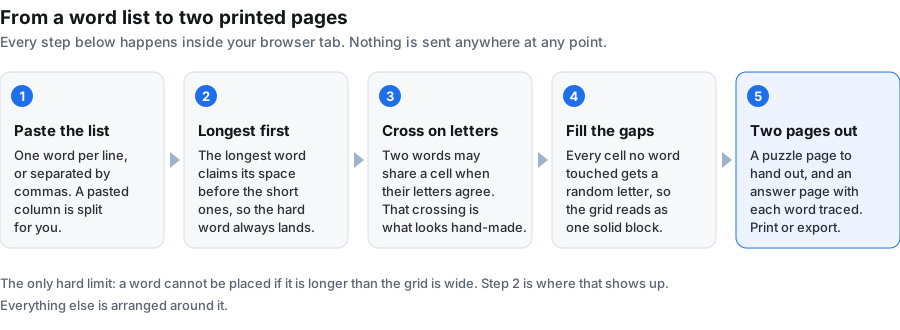
Making a word search here takes five steps
- Paste or type your words into the box. One per line, or separated by commas.
- Set the grid size. 14 is a good default; the section on grid size below gives you the numbers.
- Tick the directions you want words to run in. Horizontal and vertical are on by default.
- Press Generate word search.
- Use Download PNG or Download PDF for the page you are looking at, or Print to send it straight to the printer.
Every setting, and what it actually does
Grid size (5 to 30)
The grid is square, so one number sets both sides. Words are placed longest first, and a word cannot be placed if it is longer than the grid is wide — that is the only hard failure in the tool. Leave it at 14 for a ten-word list; go to 20 or more for long vocabulary.
Font size (10 to 26)
Letter height inside the grid and in the word bank. Younger readers and low-vision solvers do better at 20 and above. Dense grids with many words read better at 12 to 16, because the letters have to stay inside their cells.
Word bank columns (1 to 6)
How many columns the list under the grid is set in. Use 1 or 2 when your words are long, 4 to 6 when they are short. Three suits most lists.
Word directions
Horizontal and vertical are on when you arrive. Diagonal adds both diagonals. Reversed adds the backwards versions — right to left, bottom to top, and the two backwards diagonals. All four together gives eight possible directions. Switching diagonal and reversed off is the single quickest way to make a puzzle a young class can finish; switching all four on is what turns a mild list into a slow one.
Seed (optional)
Left blank, you get a fresh layout every time you press the button. Filled in, the layout is pinned. See the next section.
Reproducible puzzles: how the seed works
Most word search makers give you a new arrangement on every press and no way back to the one you just printed. That is awkward the moment you lose the answer page, or want the same puzzle for a second class next term. This generator takes a seed: type anything into the seed box — a date, a class code, a word — and the layout is derived from that seed combined with your word list.
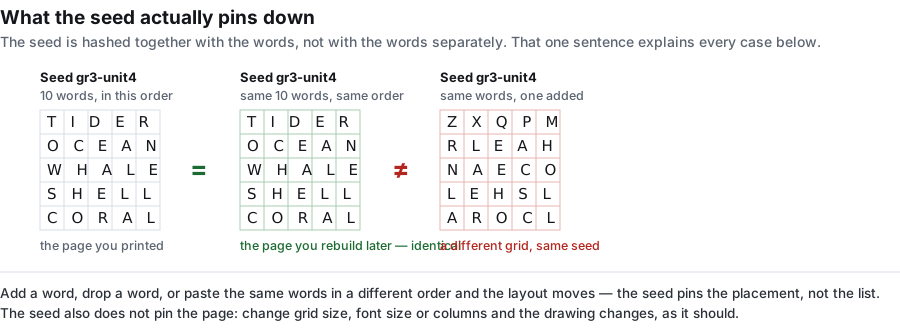
Same seed plus same word list, in the same order, gives the same grid every time. Something like gr3-unit4 is enough.
Two honest limits on that promise:
- The seed is hashed together with the words, not with the words separately. Add, drop or reorder a single word and you get a different layout even with the same seed.
- The seed pins the placement, not the page. Change the grid size, the font size or the columns and the drawing changes, as it should.
What this is for: write the seed next to the puzzle title in your plan book, and you can rebuild the exact page months later, answer page included.
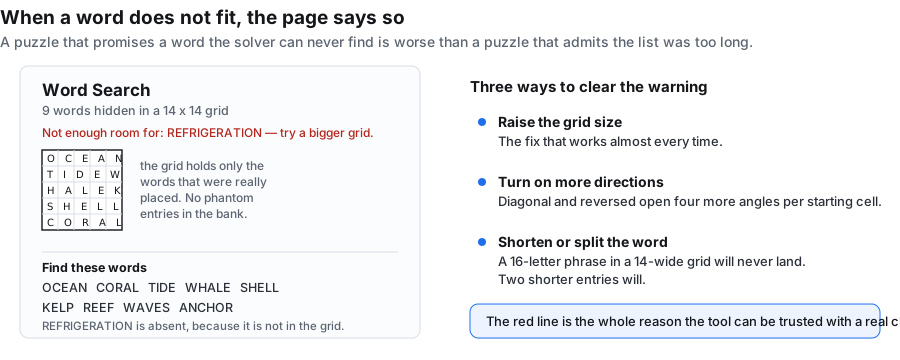
When a word does not fit, the generator says so
Placement runs longest word first, up to 400 attempts per word, and words are allowed to overlap where their letters agree — that shared-letter crossing is what makes a hand-built grid look deliberate rather than scattered. When a word still cannot go anywhere, it is not quietly dropped.
A red line under the puzzle title names every word that did not fit, and the word bank lists only the words that really are in the grid. Your puzzle page never promises a word a solver cannot find.
Three ways to clear the warning:
- Raise the grid size — the fix that works almost every time.
- Turn on more directions. Diagonal and reversed open up four more angles per starting cell.
- Shorten or split the word. A 16-letter phrase in a 14-wide grid will never land; two shorter entries will.
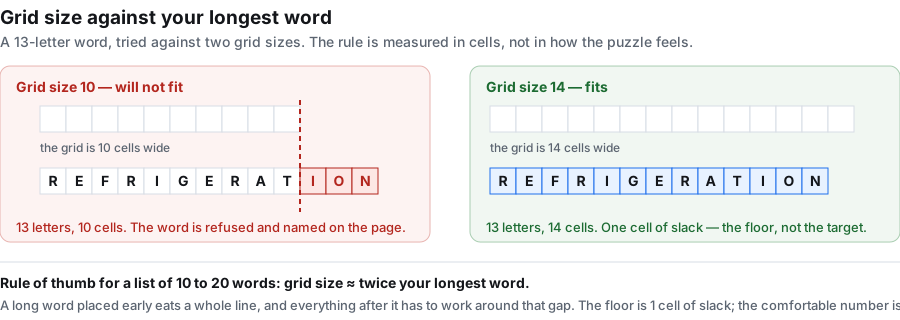
Choosing a grid size that fits your longest word
The hard rule is simply that your longest word, counted in letters, has to be no longer than the grid is wide. That is the floor, not the target. A long word placed early eats a whole line and everything after it has to work around the gap, so lists with long words need more room than the floor suggests.
A working rule of thumb: set the grid to roughly twice the length of your longest word for lists of ten to twenty words.
| Longest word | Words in the list | Grid size to try |
|---|---|---|
| 5 letters | 8 to 12 | 12 |
| 7 letters | 10 to 15 | 14 |
| 9 letters | 12 to 18 | 18 |
| 12 letters | 10 to 15 | 22 to 24 |
| 15 letters | 8 to 12 | 26 to 28 |
The rest of the grid is filler. A 14 by 14 grid holds 196 cells; ten seven-letter words account for about 70 of them before overlaps, so close to two thirds of what the solver scans is random letters drawn from A to Z. That ratio is worth knowing when you are judging difficulty: a small grid packed with words looks dense and reads hard, even when every word only runs left to right.
What the word box accepts
The parser is deliberately forgiving, and it is worth knowing exactly how, because it decides what ends up in your grid:
- Words are split on new lines, commas and semicolons, so a list copied out of a spreadsheet or an email body usually pastes in clean.
- Everything is uppercased for you.
- Letters and digits are kept. Other punctuation is dropped.
- Spaces inside an entry are kept in the word bank but removed inside the grid, so ICE CREAM is listed with its space and hidden as ICECREAM. Spaces are not cells.
- There is no minimum word count and no maximum. Capacity is set by the grid, not by the form.
One practical limit: the word bank is drawn into roughly the bottom third of the sheet. Very long lists — past about thirty words — start to run out of that space, so split them across two puzzles rather than shrinking the font to nothing.
Your word list never leaves the browser
There is no upload step because there is no upload. The whole generator runs as script in this tab: no request is sent, nothing is written to storage, and there is no account for a list to be attached to. Close the tab and the words are gone.
Two consequences that matter in practice. First, once this page has loaded you can drop off the network and keep making puzzles — useful on a locked-down school network or a flaky hotel connection. Second, a word list built from student names, an unpublished book title or an internal product name never sits on anybody else's machine.
Printing and exporting
Both pages are drawn on a 1600 by 2072 pixel sheet in black line work on white, with no background fills to eat toner.
- PNG downloads the sheet at full pixel size, good for dropping into a worksheet document or a slide.
- PDF writes a US Letter page, 612 by 792 points, with the sheet fitted inside half-inch margins — about 210 dots per inch of line work.
- Print sends the page you are currently looking at to your printer. Switch to the answer tab first if you want the solution on paper.
Printing in black and white is the default, not a setting you have to hunt for.
Word lists that work well
- A week's spelling list, which is the most common use by far.
- Vocabulary from the unit you are finishing, so the puzzle doubles as review.
- Student names in the first week, as an icebreaker.
- A party theme — a birthday, a holiday table, a baby shower.
- ESL sets built around one situation: a kitchen, an airport, a doctor's office.
- Themed sets for an activity book, where you need many puzzles at a consistent difficulty.
What else the same word list can make
The word box above feeds every puzzle type on this site, not just word search. These are the eleven built in:
The other ten live on the home page generator, where you can switch type without retyping your list. The word puzzle maker page covers the types that run on a word list, the word puzzle generator page covers getting the identical grid back later with a seed, and puzzle maker online explains why that phrase also finds jigsaw and photo-puzzle tools.
Hidden message word searches
A "hidden message word search" is a word search where, once the words are placed, the letters left over spell out a sentence for the solver to read. It is a popular variation, and a fair question is whether this maker builds it automatically. It does not — this word search fills the empty cells with random letters, so the leftovers will not spell anything on purpose.
There are two honest ways to get the effect:
- Use the Hidden Message puzzle type instead. It is built for exactly this: you paste one sentence, the letters of that sentence are placed into the grid, and the filler is drawn around them so the message is the thing to read. Switch to it from the home page generator or the word puzzle maker page.
- Approximate it on this page. Stay on Word Search and add a short extra word or two to your list. When a couple of words land in an unexpected order, solvers sometimes spot a phrase in the grid — but the leftover letters are still random, so it is a happy accident, not a guaranteed message.
If what you want is a puzzle whose whole point is the revealed sentence, the word puzzle maker page explains the types that run on a single line of text — hidden message and cryptogram are the two built for that job. For a plain crossing grid with no clues, the criss-cross puzzle maker is the closer cousin. And if you want a puzzle that needs no word list at all, the maze generator builds one from a grid size alone.
Frequently asked questions
Is this word search generator free?
Yes, and there is nothing to unlock. No account, no credits, no export limit, no watermark.
Do I have to sign up?
No. There is no login anywhere on this page. Open it, paste your words, generate.
Generator, maker or creator — is there a difference?
Not in what you get. People search all three words for the same thing: a page that turns a word list into a printable grid. This page is all three.
How many words can I use?
As many as the grid will hold. With the default 14 by 14 and horizontal and vertical on, ten to fifteen words is comfortable. Past about thirty the word bank runs short of room.
Why is one of my words missing from the grid?
There was no room for it at the current grid size and directions. The red line under the title names it. Raise the grid size, enable more directions, or shorten the word.
Can I build the same puzzle again next term?
Yes. Put a seed in the seed box before generating and write it down. The same seed with the same word list in the same order rebuilds the same grid.
Can I put numbers in my words?
Yes. Digits are kept, so entries like R2D2 or 1776 work. Other punctuation is stripped out.
Can I use two-word entries like "ice cream"?
Yes, with one thing to expect: the space is kept in the word bank and removed inside the grid, so solvers look for the letters run together.
Does it work on a phone?
Yes. The controls stack into one column on a narrow screen, and both pages scale to fit. Use the browser's share or print menu for output.
How do I make a word search with a hidden message?
Two ways. The short way: pick Hidden Message from the puzzle-type dropdown, paste one sentence into the box, and the letters of that sentence are placed into the grid with the leftovers filled around them. The longer way: stay on Word Search and add an extra short word or two to your list — many solvers find a hidden phrase once a couple of words land in an unexpected order. The Hidden Message type is the one built for the trick.
How do I make a word search with student names or spelling words?
Type one name per line into the word list box. Names work the same as ordinary words: each one is capitalized, anything that is not a letter or a digit is stripped out, and the longest name sets the minimum grid size. For a spelling list, treat it the same way — one word per line, no commas needed. About eight to fifteen entries fills a comfortable sheet.
How do I make a word search harder?
Three knobs make a search harder. First, tick Diagonal and Reversed under Word directions — words running back-to-front and on the diagonal are the slowest part to scan. Second, shrink the grid a little (a 12-grid on a 12-word list leaves very few filler squares, so there is nowhere to hide). Third, choose longer words: short words are spotted quickly, twelve-letter words are not. The reverse of each knob (untick diagonal and reversed, raise the grid, shorten the words) makes it easier.
How do I print a word search in large print?
Drag the Font size slider up to 26 — that prints letters about 2.26 millimetres high, which is under 9 point. A true large print book runs about 16 to 18 point, so this tool does not make real large print. Pair the biggest font with a grid of 14 or 16 so the cells are square rather than narrow, and if you need larger letters the practical route is to print the sheet at 150% or more. Both the puzzle page and the answer page pick up the same setting, so the key prints at the same scale as the puzzle.
How do I get the answer key?
Every word search prints as two pages. The first is the puzzle page to hand out. The second is the answer page, with the same grid and every word circled where it sits. Switch to the Answer page tab above the canvas and use Download PNG or Download PDF to save the answer sheet on its own, or use Print to send it straight to paper. The answer page is built every time, not added after the fact, so it can never disagree with the puzzle.
How do I stop words from going diagonal or backwards?
Untick Diagonal and Reversed under Word directions. Only the two that stay ticked — Horizontal and Vertical by default — will be used. For an even simpler version aimed at very young solvers, untick all four and tick only Horizontal, and every word will run left to right on one line.
What are word searches good for?
Word searches are a low-stakes focus task: a sheet of letters to scan, a word bank to cross off, and a finish line. They are widely used as a settling-in activity at the start of a lesson, as a spelling reinforcement alongside a list, and as a quiet table activity for older learners. They are not a teaching tool in the strict sense — the point is engagement and vocabulary exposure, not assessment.
What is the easiest way to find the words?
Hunt for first letters, not for whole words. Run your eye over the grid looking only for the first letter of a word from the bank, then check the eight squares around that letter for the second one — that turns a scan of the whole page into a handful of checks per word. The two kinds that stay hidden longest are the short words and the words running backwards, because both read like filler letters. If you stall, read the rows right to left for a minute: a reversed word is invisible when you only read forwards.
How do I make a word search by hand?
Draw a grid of squares on paper — a 10 by 10 grid is a hundred cells. Write your words in first, running left to right or top to bottom, then fill every empty square with a letter. The filling-in is the slow part, and it is also the part that hides the words: reuse letters that already appear in your word list so the real words do not stand out from the filler. Finish with the word bank written under the grid. A hand-drawn sheet is fine for one child at one table. The reason to use a generator instead is the last step — checking by eye that every word actually fits, and filling a hundred squares without leaving a gap, is where the time goes.
How are word searches made?
In this generator the steps are: your list is uppercased, anything that is not a letter or a digit is stripped out, and the words are placed longest first. Each word gets up to 400 tries. A try picks one direction from the boxes you ticked and one random starting square, then walks the word out from there; the word can only land where every square is either empty or already holds that same letter, which is how two words end up sharing a crossing letter. Once every word is down, each square still empty is filled with a random letter from A to Z. Two things follow from that. A word longer than the grid has nowhere to go and is named in red under the title instead of being dropped quietly. And ticking Diagonal and Reversed takes the direction list from two to eight — on a grid of 12 with fifteen words that dropped the share of builds that placed everything from 92% to 58%, because more directions means more ways for a word to clash, not more room.
Is a word find the same thing as a word search?
Yes — two names for one puzzle. "Word find" is the name used more in US elementary schools and across the Midwest; "word search" is the more common name everywhere else and the one printed on activity books. The puzzle is identical either way: a grid of letters, a bank of words hidden inside it, and the job is to circle them. This page makes that puzzle whatever you call it.
Can I use a chatbot to make a word search?
A chatbot will hand you a grid of letters as text. What it does not give you is a laid-out page: no matching answer page, no print-ready PDF or PNG, and no warning when one of your words failed to fit the grid it drew. Those three are what this page does. The puzzle and its answer page are drawn together from one layout, they export as PDF or PNG, and a word with nowhere to go is named in red under the title rather than quietly dropped.
What should I make a word search about?
The list that works best is one the solver half-knows already — words they have met but not yet mastered. That is why spelling lists and vocabulary lists are the natural fit: eight to fifteen entries out of the current week's work. A class roster works the same way. Themes come a close second: one lesson's worth of nouns (weather, animals, parts of a plant) beats a random mix, because a solver who guesses the theme starts looking for the right kind of word. What works least well is a list of very short words — three-letter words land almost anywhere and give the solver nothing to hunt for.
How do I make a word search in Google Docs?
This page is not a Google Docs add-on, and it does not hand you a Docs file. The route that works is three steps: build the sheet here, press Download PNG, then in your document choose Insert → Image → Upload from computer and pick the PNG. The finished grid and its word bank go in as one picture. Two details save a retry. Google Docs will not take the PDF as an image, so use the PNG rather than the PDF. And if you want the solution in the same document, switch to the Answer page tab above the canvas first, download that PNG as well, and insert it on a page of its own. What you do not get either way is a table of letters you can edit cell by cell — the grid is drawn, not typed, which is the entire reason it takes one button instead of an evening.
How do I make a word search for kids?
Three settings do the work. First, lower the grid size to 10 or 12 — that is the only control that changes how big the squares print, and at grid 10 they come out 16.9 mm wide, at grid 12 they come out 14.1 mm. Big squares are what small hands and new readers need. Second, keep the list short: eight to ten words. Ten words fits a grid of 10 every time; past that on a grid that small, the red line under the title starts naming the words that had nowhere to go. Third, untick Diagonal and Reversed under Word directions so every word runs left to right or top to bottom — for the youngest solvers, untick all but Horizontal. Then push the font size up to 20 or 26 to fill the larger squares. One thing that does not help: raising the grid size to fit more words makes the squares smaller, which is the opposite of what a child needs.
Are word searches good for kids?
They are good for one thing in particular: repeated, low-pressure contact with the shapes of words. A child reads CAT in the bank, hunts for a C, checks its neighbours, and circles the word — that is several passes over the same spelling with nobody testing them on it. That makes a sheet a reasonable settling-in task at the start of a lesson, a Friday activity, or something to hand a child who finished early. What they are not is a way to teach reading or spelling on their own: nothing in the puzzle asks a child to produce a word from memory, so a finished sheet cannot tell you whether the spelling stuck. We will also steer you away from any claim that word searches help with dyslexia or attention difficulties — we have nothing to back that, and a page that hands out puzzles is not the place to look for it. If a child finds a grid frustrating, drop to grid 10 and horizontal-only words; that version is genuinely easier, not just shorter.