Puzzle Maker Online
Eleven printable puzzle types, made in this tab and handed to you as a file. Paste a word list, paste a sentence, or leave the box empty for the three types that need no words at all. No login, no upload, no limit.
Nothing to print yet. Go back to the page, paste your word list, choose a puzzle type, and press Generate puzzle. Print again and you will get the puzzle page, followed by its answer page.
Your puzzle
Change the type above and press the button again — the same words, a different puzzle, from the same box.
"Puzzle maker online" means three different things
Search that phrase and you get a mixed page of results, because three quite different tools answer to it. Half of them are not even about paper. Working out which kind you want first saves you opening six tabs and finding nothing usable.
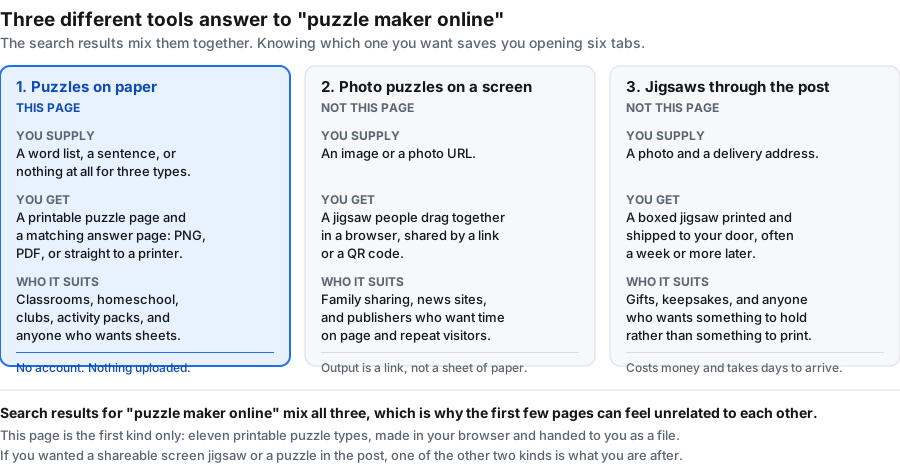
| Kind | What you supply | What you get | Here? |
|---|---|---|---|
| Puzzles on paper | A word list, a sentence, or nothing | A printable puzzle page and a matching answer page as PNG or PDF | Yes |
| Photo puzzles on a screen | An image or a photo URL | A jigsaw people drag together in a browser, shared by a link or a QR code | No |
| Jigsaws through the post | A photo and a delivery address | A boxed jigsaw printed and shipped, often a week or more later | No |
This page is the first kind and only the first kind. It makes paper. If you wanted to upload a photo and watch someone solve it on a phone, or to order a jigsaw in a box, this is the wrong tool and you should not waste time on it — the two kinds share a search term and almost nothing else.
What you get from this one, in one paragraph
Eleven puzzle types behind one box, a printable puzzle page and an answer page for every one, and both drawn as black line work on white at print resolution. No account, no credits, no export limit, no watermark, and nothing you type is sent anywhere. What you do not get is a shareable link, a QR code, a live scoreboard, or a way to watch a class solve in real time. That makes it the wrong choice if you want engagement analytics, and the right one if you want a stack of paper by Friday afternoon.
All eleven types, grouped by what they need from you
The type dropdown is not eleven variations on one idea. They split into three groups by input, and that split is the only thing that limits your choice:
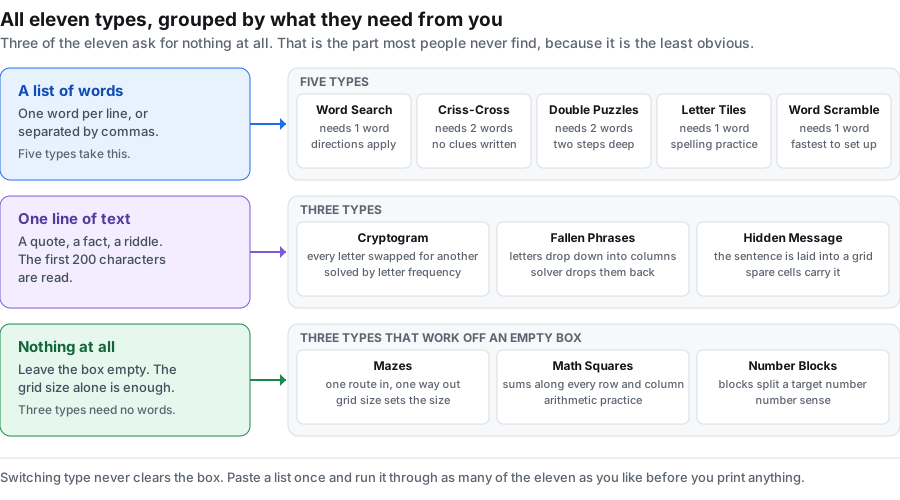
For a plain crossing grid with no clues, the criss-cross puzzle maker is the one to reach for — it is one of the eleven types, taking a word list and nothing else. The maze generator is the opposite case: it needs no word list at all and works from a grid size alone.
Three types that work with an empty box
This is the part most people never find, because every other tool of this kind insists you supply content first. Mazes, Math Squares and Number Blocks take the grid size and nothing else. Select one, press the button, and the word box disappears because it is not wanted.
- Mazes — one route in, one way out, drawn to the grid size you set. Nothing to read, so it works at any reading level and in any language.
- Math Squares — a grid where every row and column has to be made to add up. Arithmetic practice that needs no vocabulary at all.
- Number Blocks — blocks that have to be arranged to hit a target number. Number sense rather than spelling.
Between them they cover a class that cannot read the word list yet, and a lesson where the point is arithmetic rather than vocabulary. For everything that does need words, the other eight types are on the word puzzle maker page.
What each control actually does, by type
Five controls, and knowing which ones are live for the type you picked saves you pressing the button twice. This is the honest mapping, including the caps:
| Setting | Range | What it really controls here |
|---|---|---|
| Grid size | 5 to 30 | The grid for Word Search, Criss-Cross and Hidden Message, and the line length for a Cryptogram. Mazes use it too. Double Puzzles, Fallen Phrases, Letter Tiles and Word Scramble lay themselves out from your content and ignore this number entirely. |
| Columns | 1 to 6 | How many columns the word bank or tile rows are set in. The cap differs by type: 6 for Word Search and Criss-Cross, 4 for Fallen Phrases, 3 for Double Puzzles, and 2 for Letter Tiles and Word Scramble. Ask for more than the cap and you get the cap. |
| Directions | 4 checkboxes | Word Search only. The whole field is hidden for the other ten, because their layouts are fixed. |
| Font size | 10 to 26 | Live for all eleven, on the puzzle page and the answer page alike. This is the large print control. |
| Seed | any text | Live for all eleven. Same seed plus same content rebuilds the same puzzle, in any type, months later. |
Large print: the same puzzle for low vision and younger readers
Most puzzle makers either fix the type size or hide it behind a paid plan, which quietly locks out older solvers and anyone printing for a low-vision reader. Here it is two numbers, and both are free.
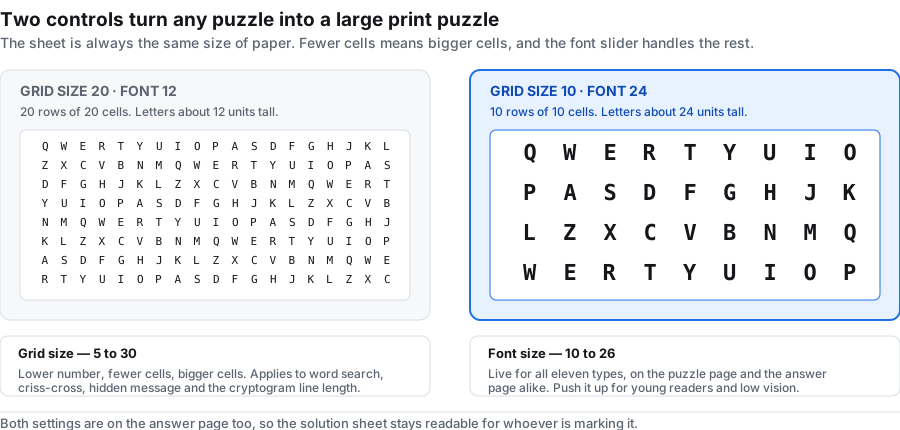
The sheet is drawn at a fixed 1600 by 2072 pixels whatever you choose, so a grid of 10 fills the same paper as a grid of 20 — each cell is simply twice the width. Drop the grid size, raise the font size, and you have a large print sheet without changing anything else. Both settings apply to the answer page too, so whoever is marking it is not squinting at a shrunken solution.
The practical version for an activity session: grid size 10, font size 24, eight to ten short words, and horizontal and vertical only. That is a sheet an older reader can finish without a magnifier, and it prints identically on any printer.
One word list, three puzzles: a worked example
Take the ten-word ocean list that sits in the box when you arrive — OCEAN, CORAL, TIDE, WHALE, SHELL, KELP, REEF, WAVES, ANCHOR, HARBOR.
- Word Search, horizontal and vertical only. This is the sheet you hand out. With two directions instead of four, a seven-year-old can finish it unaided.
- Word Scramble, from the same ten words. The letters of each are jumbled and the solver writes the word back. Same vocabulary, different skill: spelling rather than scanning.
- Mazes, grid size 12, no words needed at all. The early finisher sheet, and the one that works for a child who cannot read the list yet.
Three sheets, one paste, about two minutes. Set a seed first and all three come back identical next term.
That last sentence is the whole idea behind the word puzzle generator page, which goes through the seed step by step.
Printing and exporting
Both pages are drawn on a 1600 by 2072 pixel sheet in black line work on white, with no background fills to eat toner.
- PNG downloads the sheet at full pixel size, good for dropping into a worksheet document or a slide.
- PDF writes a US Letter page, 612 by 792 points, with the sheet fitted inside half-inch margins — about 210 dots per inch of line work.
- Print sends the page you are looking at to your printer. Switch to the answer tab first if you want the solution on paper.
Your words never leave the browser
There is no upload step because there is no upload. The whole maker runs as script in this tab: no request is sent, nothing is written to storage, and there is no account for a word list to be attached to. There is no analytics script on the page either.
The practical consequence is that once the page has loaded you can drop off the network and keep making puzzles. That matters on a locked-down school network, on a tablet in a classroom without reliable wifi, and for anyone working with a word list they would rather not hand to a third party — an exam paper in draft, a pupil's name list, a medical spelling list. Close the tab and the words are gone.
What this puzzle maker does not do
Said plainly, so you can rule it out quickly if it is the wrong fit:
- No shareable link, QR code or online play. Output is a file. Nobody solves these on a screen.
- No clue writing. None of the eleven types attaches a definition or a prompt to an entry. Criss-Cross is an open interlocking grid where words cross at shared letters, and the overlaps are the only help the solver gets. If your content only makes sense once a definition is attached to it, none of the types here is the right fit.
- No photo or image puzzles. Nothing on this page takes an upload.
- No live results, scoreboard or progress tracking. You cannot see who finished first.
- No saved account or puzzle library. Nothing is stored between visits. Use the seed instead of a saved project.
Frequently asked questions
What is an online puzzle maker?
A page that turns content you supply into a finished puzzle. Most of them fall into one of three kinds: printable word and number puzzles, screen-based photo jigsaws, or physical jigsaws you order by post. This one is the first kind — eleven printable types, output as PNG or PDF.
Is this puzzle maker free?
Yes, and there is nothing to unlock. No account, no credits, no export limit, no watermark, and no cap on how many puzzles you make in a day.
Do I have to sign up or install anything?
No. There is no login and no signup anywhere on this page, and nothing to install. It runs in the browser tab you already have open.
How many puzzle types are there?
Eleven: Word Search, Criss-Cross, Double Puzzles, Fallen Phrases, Math Squares, Mazes, Letter Tiles, Cryptograms, Number Blocks, Hidden Message and Word Scramble. All eleven are in the dropdown at the top of this page.
Can I make a puzzle without any words?
Yes, three of the eleven. Mazes, Math Squares and Number Blocks are built from the grid size alone — select one and the word box disappears because it is not needed.
How many words do I need?
One is enough for most types. Criss-Cross and Double Puzzles need at least two. In practice eight to fifteen words makes a sheet that takes a class about ten minutes, which is the size most people want.
Can I use the same word list for more than one puzzle type?
Yes, and that is the point of the page. The word box is not cleared when you change type. Paste once, then generate the same list as a word search, a scramble and a letter-tile sheet.
Which puzzle is easiest for young children?
Word Search with diagonal and reversed switched off, so words only run left to right and top to bottom. Word Scramble works from about six years old too. For children who cannot read yet, Mazes needs no reading at all.
Can I make a large print puzzle?
You can make the biggest letters the tool allows, but read the limit first. The font size slider runs from 10 to 26, and 26 prints letters about 2.26 millimetres high — under 9 point. A true large print book runs 16 to 18 point, so this tool does not make real large print. Lower the grid size so there are fewer, bigger cells; that makes the cells square at the largest font rather than narrow. Both the puzzle page and the answer page get the same settings. If you need letters bigger than that, read the measured tables on the large print word search page.
Can I add clues or definitions to my words?
No. None of the eleven types writes clues. Criss-Cross is an open interlocking grid with no prompts in it. If your words only make sense with a definition attached, this is not the right tool.
Why is one of my words missing from the puzzle?
In Word Search and Criss-Cross there was no room for it in the grid. The word is not quietly dropped: a red line under the title names it, and the word bank lists only what really made it in. Raise the grid size, switch more directions on, or use a shorter word. The full walkthrough is on the word search generator page.
Can I build the same puzzle again later?
Yes. Put something in the seed box before you generate and write it down. The same seed with the same content, in the same order, rebuilds the identical puzzle — in any of the eleven types.
Can I use numbers or two-word entries?
Digits are kept, so R2D2 and 1776 work. For a two-word entry like ICE CREAM, the space is kept in the word bank and removed inside the grid, so solvers look for the letters run together.
Will my class be able to play these online?
No. These puzzles come out as paper — a PNG or a PDF you print. There is no shareable link, no QR code and no scoreboard.
Is my word list stored anywhere?
No. The generator runs entirely in your browser and sends no request. Nothing is written to storage and there is no account. Close the tab and the words are gone.
Does it work on a phone or tablet?
Yes. The controls stack into one column on a narrow screen and both pages scale to fit. Use the browser's share or print menu for output.
Is this a jigsaw puzzle maker?
No — and that is the disambiguation worth making up front, because the search engine mixes the two meanings. The three common uses of puzzle maker online are: a worksheet / pencil-and-paper puzzle maker (this site), a photo-to-jigsaw converter that ships a cardboard puzzle to your address, and an online jigsaw that you play in the browser without printing. This site is the first kind: you put in a word list, you get a printable puzzle page and its answer page. The other two do not take a word list and do not produce a worksheet.
Can I save my puzzle and edit it later?
Not directly. Nothing is stored, so there is nothing to save back into. Two things act as your record: the word list and the seed. Keep the same word list and the same seed (and the same grid size and direction settings) and pressing Generate puzzle again rebuilds the identical puzzle in any of the eleven types. That is how you come back to a puzzle later — not by loading a saved file, but by replaying the inputs.
Can I use this with my own word list?
That is what it is built for. Paste your list into the word box — one word per line, or several separated by commas — pick a type, press the button. Your list never leaves the browser, so you can use vocabulary, names, or content you would not put into a third-party site.
How do I make a puzzle online for free?
Put your words in the word box, choose a type, and press Generate puzzle. That is the whole sequence — there is no account step, no email step and no payment step in it, and nothing to install. The puzzle page and its answer page come back in the same tab, and you take them as a PNG or a PDF. One thing worth doing before you generate: type something short into the Seed box and write it down. The same seed with the same word list rebuilds the identical puzzle later, which matters because this page has no saved projects — it does not keep anything between visits.
Can you make your own puzzle?
Yes, and that is the only kind made here. You bring the content — a word list, or a sentence for the cryptogram, fallen phrase and hidden message types — and the page does the layout. It does not choose words for you, and there is no library of ready-made puzzles to copy from. If you want to see what one looks like before you commit to a list, press Use sample words, generate, then replace the sample with your own.