Printable Word Searches for Adults
Type your words, press one button, and print a finished word search for adults with its answer page. Bigger squares for older eyes, harder grids for a challenge, your own list — no account, no email, no watermark, and no cap on how many you make.
Nothing to print yet. Go back to the page, paste your word list, choose a puzzle type, and press Generate puzzle. Print again and you will get the puzzle page, followed by its answer page.
Your puzzle
Both pages are drawn at print resolution, so the grid lines stay solid on paper.
Word searches for adults, made to print
Most of what comes up for a word search for adults is one of two shapes: a library of finished puzzles somebody else picked the words for, or a site built around a different kind of puzzle. This page is the other shape — the maker. You bring the words, it draws the letter grid, and you print the puzzle page and its answer page. Nothing is uploaded, nothing is watermarked, and nothing asks you to sign up.
Be clear about what this is and is not: it is a letter grid where you hunt for words, not a puzzle where every entry comes with a clue to fill in. If you wanted the clue kind, this is not the tool. For a plain word search with your own list, this is the whole job.
One sheet for the puzzle, one for the answers
Every word search built here comes out as two pages drawn on the same sheet size. The puzzle page carries the letter grid with the word bank underneath it. The answer page carries the same grid with every hidden word traced over it, and the same word bank struck through. Both are drawn from one layout, so the answer can never disagree with the puzzle you handed out. Because the two pages are the same size, they register with each other if you print them back to back.
There is no watermark on either page, and nothing in the corner asking a solver to sign up. Print ten copies or two hundred: nothing on this page counts them or caps them.
Bigger squares for older eyes
The one control that changes how big the letters print is the grid size, and for an adult who wants a comfortable sheet a grid of 10 or 12 is the usual place to start. The full measurement is in the table below. If you want to go further — letters past about 9 points on paper — the large print word search page has the letter-size table and the print-scale numbers; this tool's font slider tops out at a size that prints under 9 points, so a genuine large-print book is not something it draws.
Harder grids for people who want a challenge
A word search for adults does not have to be easy. Tick Diagonal and Reversed and the words can run backwards and on the slant, which is what makes a grid actually hard to scan. One warning from the tool's own behaviour: spreading the placement tries across eight directions instead of two makes a crowded list harder to fit, not easier. On a grid of 12 with a fifteen-word list, horizontal and vertical alone placed everything in 11 runs out of 12, while all eight directions managed 7 out of 12. So turn on the extra directions for difficulty, but raise the grid size if your list stops fitting.
How big the squares print
A printable word search lives or dies on one measurement — how wide each square is on the paper. Too small and the letters stop being scannable; too large and a ten-word list needs a poster. Here is the real number for each grid size, taken off the PDF this page produces.
| Grid size | Square on paper | Good for |
|---|---|---|
| 5 | 33.8 mm | Very young solvers, or a five-word list |
| 8 | 21.1 mm | Early readers |
| 10 | 16.9 mm | Large print, low-vision solvers |
| 12 | 14.1 mm | First and second grade |
| 14 | 12.0 mm | The default, comfortable for most classes |
| 16 | 10.5 mm | Upper elementary and up |
| 18 | 9.3 mm | Longer vocabulary lists |
| 20 | 8.5 mm | Teen and adult sheets |
| 24 | 7.0 mm | Dense adult puzzles |
| 30 | 5.6 mm | The maximum grid; small print |
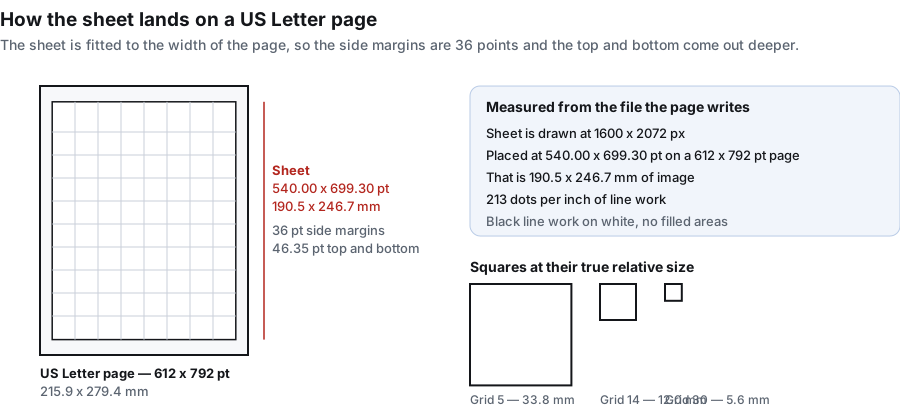
Measured with a ten-word list, font size 16, three word-bank columns, on the PDF export. The sheet itself is drawn at 1600 by 2072 pixels. Reading the file the page actually writes, the page box is 612 by 792 points and the sheet is placed at 540.00 by 699.30 points — 190.5 by 246.7 millimetres — inside 36-point side margins. That works out to 213 dots per inch of line work, which is why the grid lines stay solid instead of stepping.
Font size does not move the squares
This catches people out. The Font size slider changes how tall the letters are inside each square and in the word bank underneath, but it does not change the size of the squares themselves. Measured on a grid of 14 with a ten-word list, the squares came out 101 pixels — 12.03 mm on paper — at font size 10, at 16, at 20 and at 26 alike. The letters themselves stay the same physical size on paper whatever grid you pick; only the squares around them change. So: lower the grid size for bigger squares, raise the font size for bigger letters in the squares you already have.
How many words fit on one sheet
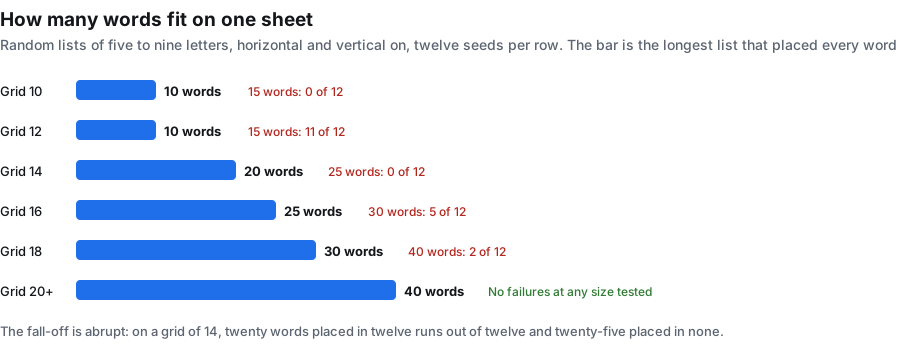
The other question people have before they print is how long their list can be. Below, each cell was tested with randomly generated lists of five to nine letters, with horizontal and vertical turned on and twelve different seeds. The number given is the longest list that placed every single word in all twelve runs.
| Grid size | Longest list that always fitted | What happened one step further |
|---|---|---|
| 10 | 10 words | 15 words fitted in 0 of 12 runs |
| 12 | 10 words | 15 words fitted in 11 of 12 runs |
| 14 | 20 words | 25 words fitted in 0 of 12 runs |
| 16 | 25 words | 30 words fitted in 5 of 12 runs |
| 18 | 30 words | 40 words fitted in 2 of 12 runs |
| 20 and up | 40 words | No failures at any size tested |
The fall-off is sharper than it looks. On a grid of 14, twenty words placed cleanly in twelve runs out of twelve and twenty-five words placed in none of them. There is no gentle middle: either the list fits or the page tells you it did not.
When a word cannot be placed it is not quietly dropped. A red line under the puzzle title names every word that did not fit, and the word bank lists only the words that really are in the grid. A printed sheet never promises a word a solver cannot find.
Turning on more directions does not buy you more room
The obvious fix for a list that will not fit is to tick Diagonal and Reversed. On this tool the obvious fix is wrong. Placement tries a fixed number of positions per word and picks a direction at random for each try; spreading those tries across eight directions instead of two means each direction gets fewer of them. Measured on a grid of 12 with a fifteen-word list, horizontal and vertical alone placed everything in 11 runs out of 12, while all eight directions managed 7 out of 12. On a grid of 18 the two settings ended up the same. When a list will not fit, raise the grid size — that is the fix that works.
Longer lists shrink the squares
The word bank under the grid is given a share of the sheet before the grid is drawn, so a longer list means a shorter grid and therefore smaller squares, even at the same grid size. Measured on a grid of 14 with five-letter words:
| Words in the list | Square on paper |
|---|---|
| 10 | 12.0 mm |
| 15 | 11.9 mm |
| 20 | 11.2 mm |
| 25 | 10.5 mm |
| 30 | 10.1 mm |
| 50 | 9.8 mm |
So the two limits arrive together: a list long enough to squeeze the squares is usually also a list long enough to trip the warning. In the same run, thirty five-letter words on a grid of 14 brought up the red line even with every direction switched on.
What the sheet asks of your printer
Both pages are black line work on white: no filled blocks, no shading, no colour a mono printer has to approximate. Counted by pixel, 3.5% of the puzzle sheet carries ink and 5.7% of the answer sheet — the difference is the circles drawn over the hidden words. Black and white is the normal case here, not a setting you have to hunt for.
- PNG gives you the sheet at its full 1600 by 2072 pixels, which is what you want for dropping into a worksheet document or a slide.
- PDF gives you the US Letter page described above, fitted with 36-point side margins.
- Print sends the page you are currently looking at to your printer. Switch to the Answer page tab first if you want the solution on paper.
Two things that go wrong in print dialogs. Choose Actual size or 100% rather than Fit to page, which some drivers interpret as a few percent of shrink and the squares go soft. And leave the orientation on portrait — the sheet is already taller than it is wide.
Word lists you can paste straight in
If you arrived without a list, here are four that print well as-is. Paste one block into the box and press the button.
- Autumn: PUMPKIN, HARVEST, ORCHARD, SCARECROW, CIDER, HAYRIDE, ACORN, BONFIRE, SQUASH, CROW
- Ocean animals: WHALE, DOLPHIN, OCTOPUS, CORAL, JELLYFISH, SEAL, SHARK, TURTLE, KELP, ANCHOR
- In the kitchen: KETTLE, SPOON, COLANDER, GRATER, WHISK, LADLE, SKILLET, APRON, OVEN, PANTRY
- Space: ORBIT, COMET, CRATER, GALAXY, LUNAR, SOLAR, TELESCOPE, ROCKET, METEOR, NEBULA
A spelling list works exactly the same way: one word per line, no commas needed. Eight to fifteen entries is a comfortable sheet.
When a finished puzzle is what you actually want
Being straight about this: if you want a themed puzzle to print this minute and you have no words in mind, a library of finished puzzles is faster than this page. You click, you print. This page is the right tool when the words themselves matter — this week's spelling list, the vocabulary from the unit you just finished, the names of the children in the class, an unpublished product name, an in-joke at a family table. A library cannot contain any of those, and no library will ever have your list.
One line on the trade: a library hands you somebody else's topic instantly, this page hands you your own words in about thirty seconds.
What else the same word list can make
The word box above feeds every puzzle type on this site, not just word search. These are the eleven built in:
The other ten live on the home page generator, where you can switch type without retyping your list. If what you need is the same grid again next term, the word search generator page covers how the seed pins a layout. If you would rather run one word list through several different puzzle shapes, the word puzzle maker page covers the types that take a list. For the printable side of things, the free printable word search page keeps the square-size table front and centre, and the printable word puzzles page walks through all eleven types with their measured ink and file size.
Frequently asked questions
Is it really free?
Yes, with nothing behind it. No account, no email, no export cap, no watermark, no trial counter.
Do I need to sign up or give an email address?
No. There is no login and no email field anywhere on this page. Open it, paste your words, generate, print.
How many copies can I print?
As many as you like. The puzzle is drawn in your browser and the file is yours; nothing on this page counts prints or puts a limit on them.
What size are the squares when I print it?
It depends only on the grid size. At grid 10 they print 16.9 mm wide, at grid 14 they print 12.0 mm, at grid 20 they print 8.5 mm, and at the maximum grid of 30 they print 5.6 mm. The full table is above.
Does the font size slider make the squares bigger?
No. It makes the letters taller inside the squares and in the word bank. Measured on a grid of 14, the squares stay 12.03 mm at font size 10, 16, 20 and 26. Lower the grid size to get bigger squares.
How many words can I put in one puzzle?
Twenty on a grid of 14, twenty-five on 16, thirty on 18, and forty or more from 20 upwards. On a grid of 10 or 12, plan for about ten words. When a word does not fit, a red line under the title names it.
Why is one of my words missing?
There was no room for it at the current grid size. The red line under the title names it and the word bank leaves it out. Raise the grid size, or shorten the word — turning on more directions does not reliably help, and on small grids it makes things slightly worse.
How do I make the squares bigger?
Lower the grid size. That is the only control that changes the square size. Grid 12 gives 14.1 mm squares and grid 10 gives 16.9 mm, which is a common choice for large-print sheets.
How do I get the answer key?
Every puzzle prints as two pages. Switch to the Answer page tab above the canvas and use Download PNG, Download PDF or Print. The answer page is built at the same time as the puzzle, so it can never disagree with it.
Can I use student names or spelling words?
Yes. Type one name or one word per line. Each entry is uppercased, anything that is not a letter or a digit is stripped out, and the longest entry sets the minimum grid size.
Does it print well in black and white?
Yes — it is drawn that way. Black line work on white with no filled areas, and only about 3.5% of the sheet carries ink on the puzzle page.
What paper size is the PDF?
US Letter. The page box is 612 by 792 points and the sheet is placed at 540.00 by 699.30 points, which is 190.5 by 246.7 millimetres, inside 36-point side margins.
Do my words get uploaded anywhere?
No. The whole generator runs as script in this tab: no request is sent, nothing is written to storage, and there is no account for a list to be attached to. Close the tab and the words are gone.
Can I use it without an internet connection?
Once the page has loaded, yes. There is no server call in generating or printing, so you can drop off the network and keep making puzzles.
How do I make a printable word search?
Type one word per line into the box, leave the grid at 14, press Generate word search, then press Print or Download PDF. That is the whole process. Switch to the Answer page tab first if you want the solution printed as well.
How do I print a giant word search?
Lower the grid size, which is the only thing that changes the square size. A grid of 5 prints squares 33.8 mm wide and a grid of 8 prints 21.1 mm, both large enough to read across a table. Raise the font size afterwards to fill the bigger squares.
Can I make one in Microsoft Word instead?
Not with this page — it is not a Word template and it does not hand out a document file. What it does instead is skip the fiddly part: you paste the same list here and get a finished sheet plus its answer sheet, without drawing a table and filling it by hand. If you need the puzzle inside an existing Word document, download the PNG and drop it in as a picture.
Do word searches help with spelling?
They help with exposure rather than accuracy. A solver sees the word, scans for it letter by letter and checks it off, which is repeated contact with the spelling — but nothing in the puzzle asks them to produce the word from memory. Treat it as reinforcement alongside a spelling list, not as the practice itself.
Where can I print puzzles?
Anywhere a printer is: at home, in the school workroom, or at a copy shop. Use Download PDF first, then take the file with you on a phone or a drive — the PDF is a single US Letter page per sheet, which is what a counter expects.
Are word searches good for adults?
A finished sheet asks for one thing at a time: hold a word in your head, sweep the grid for its first letter, check its neighbours in whichever directions the puzzle allows, and move on. That is the whole of it — and for a lot of adults it is exactly the point. Twenty minutes with a pen, no screen, no timer, and a definite finish. The two ways adults use this page most are a themed sheet for a group — a holiday table, a staff room, a waiting area — and a single sheet to do at the kitchen table. What we will not tell you is that doing them keeps your mind sharp. We have nothing to back a claim like that, and a page that hands out puzzles is the last place to look for it.
Are word searches good for seniors?
For an older solver the puzzle matters less than the printing. Two things decide whether a sheet is comfortable: how tall the letters are, and how much white space sits around them. On this tool the font slider goes to 26, which prints letters about 2.26 mm tall — under 9 pt. That is bigger than a newspaper caption, but well short of the 16–18 pt used in large-print books, so the honest route to bigger type is your printer's own scale setting, where 150% is the usual choice; the measured size at each setting is on the large print page. The answer sheet always prints on its own page, so a solver who gets stuck on the last word is never stuck for good.
Are word searches good for your brain?
Doing one uses scanning, letter-pattern matching, and holding a short string of letters in mind while you look for it. That is as far as the honest claim goes. We are not going to say it improves memory, protects against decline, or treats anything — we have no evidence for that, and a puzzle site should not imply it. What a printed sheet reliably gives you is a fixed, finite task with no notifications attached to it.