Word Puzzle Generator
Paste a word list, set a seed, and the generator lays out any of eleven printable puzzle types for you. Same seed plus same words rebuilds the identical puzzle later, in any type. The whole generator runs in this tab — nothing is uploaded, nothing is stored.
Nothing to print yet. Go back to the page, paste your word list, choose a puzzle type, and press Generate puzzle. Print again and you will get the puzzle page, followed by its answer page.
Your puzzle
Change the type above and press the button again — the same words, a different puzzle, from the same box. Set a seed first and it is the same puzzle too.
What "generator" means on this page
Most puzzle pages are randomizers that hide the result. You press a button, you get a layout, and if you want that exact layout again next week you have no way to get it back. This one is built the other way round: every layout is the output of a small deterministic routine that takes your words and a seed and produces one fixed grid. Leave the seed blank and the routine still runs, it just picks the seed for you. Write the seed down and the same numbers go in and the same puzzle comes out, in any of the eleven types.
That is the whole difference between a randomizer and a generator you can trust for a worksheet: reproducibility. Two children in different rooms, same seed, same words, get the same sheet.
One word list, eleven puzzle types
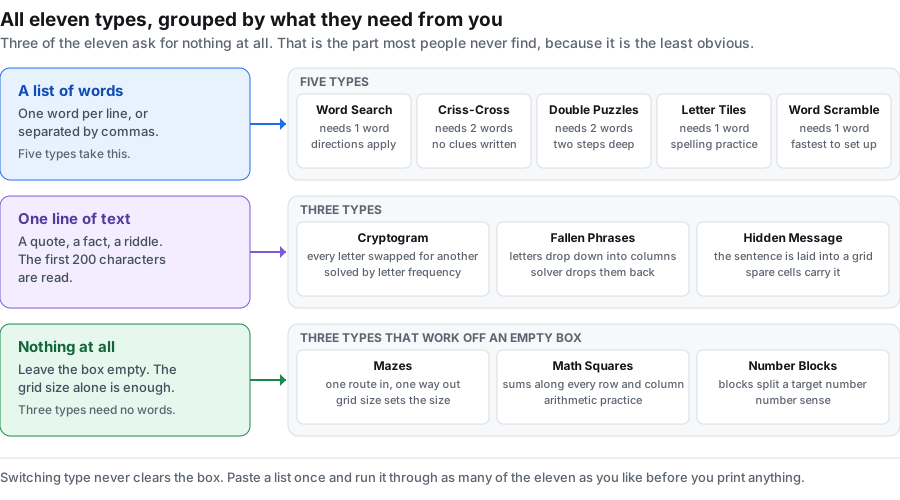
The dropdown holds the full set. They split by what they take as input — a word list, a single sentence, or nothing at all — and that split is the only thing that limits which ones you can pick.
| Generator uses | Generator ignores |
|---|---|
| Word list: Word Search, Criss-Cross, Double Puzzles, Letter Tiles, Word Scramble, Fallen Phrases, Hidden Message | Grid size and directions (these types lay themselves out from your content) |
| Sentence (first 200 chars): Cryptogram, Fallen Phrases, Hidden Message | Columns beyond what the type needs |
| Grid size only: Maze, Math Squares, Number Blocks | The word box entirely — leave it blank |
The word box is not cleared when you switch type. Paste your list once, then run it through two or three formats and keep the one that suits the room.
Two of the other pages drill into one corner of this: word search has the most settings of the eleven, and word puzzle maker walks through the types that run on a word list. If you came here looking for a tool that turns a photo into a puzzle, the puzzle maker online page explains why that search term finds three different things.
If your list calls for a no-clue crossing grid rather than a sentence-based puzzle, the criss-cross puzzle maker builds that from the same words — and it takes a seed the same way, so it is reproducible too. The maze generator works on the same principle, and there the seed pins the answer route as well as the puzzle.
Seed reproducibility, step by step
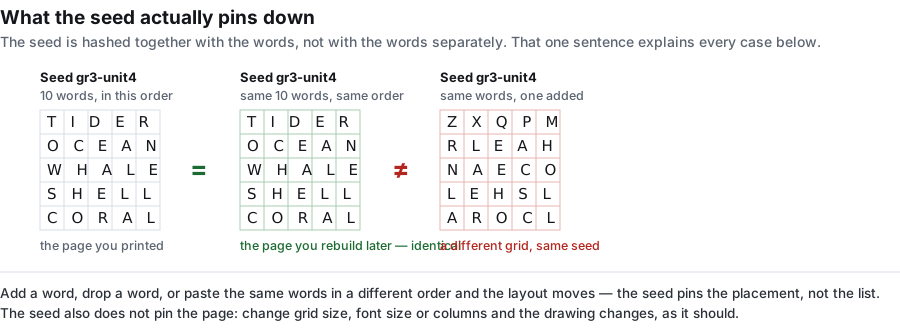
The seed is a string the generator feeds into its layout routine. The routine is deterministic, so the same string plus the same words always produces the same grid — the same letter in the same cell, the same word in the same place. Change one character of the seed and you get a different layout; change one word and you get a different layout. This is what makes a puzzle you can hand back next term identical to the one you handed out this term.
- Type your word list into the box at the top.
- Type any short phrase into the seed box — a date, a class code, "term3".
- Pick a type and press Generate puzzle.
- Write the seed on the worksheet. Next time, the same seed rebuilds the same puzzle in any type.
The seed travels with the puzzle, not with an account. There is no profile to save it to, because there is no account. If you want the puzzle again, the seed is the only record you need, and it lives on the paper you printed.
Grid size versus the longest word
Grid size only matters to the four types that place your words into a fixed square: Word Search, Criss-Cross, Hidden Message, and the line length of a Cryptogram. The rule the generator enforces is simple — the longest word you give it has to fit on one line inside the grid. Ask for a 14-wide grid and paste a 20-letter word, and the generator will not silently shrink your word; it refuses the word and tells you which one.
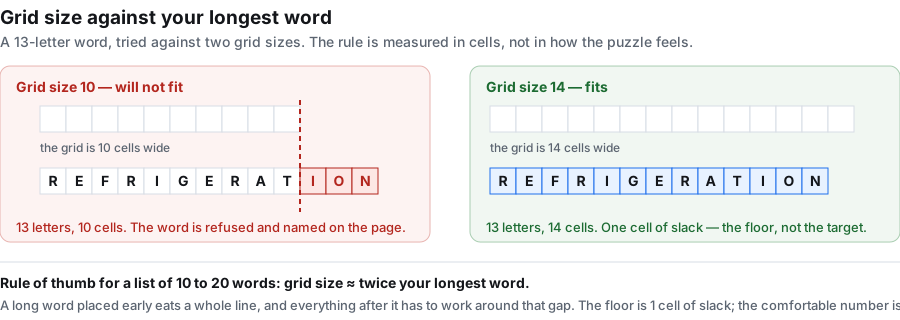
A practical guide: a grid two or three cells wider than your longest word leaves room for the short words to cross and for filler letters. A list of ten-letter words is comfortable in a 14 grid; the same list in a 10 grid starts refusing words. When in doubt, go one size up rather than down.
What happens when a word will not fit
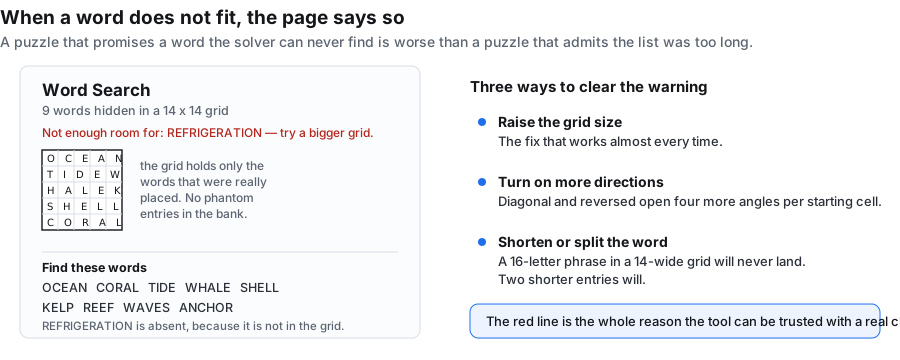
Word Search and Criss-Cross place words into a grid, so they are the two types where a word can be refused. The generator does not quietly drop it — a red line under the puzzle title names the word, and the word bank lists only what is really in the grid. You see exactly which words made it and which did not.
The other nine types size themselves to your content, so a word that does not fit is not a failure mode they have. Mazes, Math Squares and Number Blocks do not read the word box at all.
What the generator does for each of the eleven types
Same box, same seed, eleven different outputs. This is the honest list of what each type takes from your input and what it draws:
| Type | Generator uses | Generator draws |
|---|---|---|
| Word Search | Your words + grid size + directions | A letter grid with your words hidden in it, filler letters in the rest |
| Criss-Cross | Your words + grid size | An open interlocking grid, no clues written in |
| Double Puzzles | Your words (short answers) | Two short answers whose letters spell a second answer |
| Fallen Phrases | A sentence (or word list) | Letters of a sentence dropped into columns beneath their position |
| Math Squares | Grid size only | A grid of arithmetic cells to solve |
| Mazes | Grid size only | A single solvable path through a grid |
| Letter Tiles | Your words | Each word cut into tiles dealt out of order |
| Cryptograms | A sentence | One sentence with every letter substituted |
| Number Blocks | Grid size only | A grid of number-grouping cells |
| Hidden Message | A sentence (or word list) | A letter grid built around your sentence |
| Word Scramble | Your words | Each word with its letters jumbled |
Three practical generator workflows
The same box supports three ways people actually use it:
- One list, one type, many terms. Set a seed, generate a word search, write the seed on the sheet. Next term you regenerate the identical puzzle for revision. Nothing is stored because the seed is on the paper.
- One list, several types, same lesson. Run the kitchen list (BREAD, BUTTER, CHEESE, EGGS, FLOUR, HONEY, MILK, OLIVE, PEPPER, SUGAR) as a word search for the group, a word scramble for spelling, and a criss-cross for the three who finish first. One paste, three sheets.
- Grid only, no words. Blank the word box, pick Maze, Math Squares or Number Blocks, set a size. The generator fills the grid from the size alone — useful when the point is the structure, not the vocabulary.
Two pages out, every time
Whatever type you generate, you get two finished sheets: the puzzle page to hand out and the answer page to keep. Both are drawn at print resolution in black line work on white, with no background fills to eat toner. Switch to the answer tab and download or print it on its own. This is not a setting you toggle per type — it is how the generator always works, because a puzzle without its key is just a page of letters.
What this generator does not do
Two things are out of scope by design. First, it does not write clues. Criss-Cross is an open interlocking grid with nothing prompting the solver; if your content only works once a definition is attached, this is not the right tool. Second, it does not host or share. There is no link, no QR code, no live scoreboard — you get files, not a presence on the web. If you want to see who finished first, this is the wrong generator; if you want a stack of paper by Friday, it is the right one.
Your words never leave the browser
There is no upload step because there is no upload. The whole generator runs as script in this tab: no request is sent, nothing is written to storage, and there is no account for a list to be attached to. Once the page has loaded you can drop off the network and keep generating, which matters on a locked-down school network. Close the tab and the words are gone.
Frequently asked questions
What is a word puzzle generator?
A page that turns content you supply — usually a list of words — into a finished puzzle you can print, and does it the same way every time you give it the same inputs. This one makes eleven kinds of puzzle from the same box and draws an answer page alongside every one.
What is the difference between a generator and a maker?
Same tool, different emphasis. "Maker" stresses the building; "generator" stresses that the layout is produced by a repeatable routine. The seed box is what makes this a generator: write it down and the same words rebuild the same puzzle later, in any type.
How do I make the same puzzle again next term?
Put a seed in the seed box before generating and write it on the worksheet. The same seed with the same words, in the same order, rebuilds the same puzzle. There is no account to save it to, so the seed on the paper is the only record you need.
How many words do I need?
One is enough for most types. Criss-Cross and Double Puzzles need at least two. A list of eight to fifteen words makes a sheet that takes a class ten minutes, which is the size most people want.
Can I use the same word list for more than one puzzle type?
Yes, and that is the point of the page. The word box is not cleared when you change type. Paste once, then generate the same list as a word search, a scramble and a letter-tile sheet.
Why is one of my words missing from the grid?
In Word Search and Criss-Cross there was no room for it — usually the grid was smaller than your longest word or too few directions were on. A red line under the title names it. Raise the grid size, switch more directions on, or shorten the word.
Can I make a puzzle from a sentence instead of a list?
Yes, for three of the eleven. Cryptogram, Fallen Phrases and Hidden Message take one line of text and read the first 200 characters. Fallen Phrases and Hidden Message also accept a word list.
Does it write clues or definitions?
No. None of the eleven types writes clues. Criss-Cross is an open interlocking grid with no prompts in it. If your words only make sense once a definition is attached, this generator is not the fit.
Is this word puzzle generator free?
Yes, with nothing to unlock. No account, no credits, no export limit, no watermark, and no cap on how many puzzles you make in a day.
Do I have to sign up?
No. There is no login and no signup anywhere on this page. Open it, paste your words, generate.
Will my puzzles be shareable online?
No. They come out as paper — a PNG or a PDF you print. There is no shareable link, no QR code and no scoreboard. If you want to share, you export the file and send it yourself.
What does "reproducible" mean here?
It means the layout is not random each time you press the button — it is computed from your word list and the seed by a routine that always returns the same result for the same inputs. The same word list with the same seed will draw the same grid every time, on any computer, in any of the eleven types. Reproducibility is what makes a worksheet you can hand back next term identical to the one you handed out this term.
How does the seed actually work?
It is a short string — anything will do, a date, a class code, a word. The generator passes that string into a deterministic shuffling routine, and the routine picks where each word lands. Empty the seed box and the routine still runs; it just picks a seed for you. Two words the same, one seed the same: identical puzzle. Two words the same, seeds different: different puzzles. The seed is what pins the layout down.
What happens if I don't set a seed?
You still get a puzzle — the generator just picks a seed for you at random and uses it. Next time you press the button without a seed, you get a different random layout. If you want the same puzzle again later, write down the seed string you typed (or note which word list and grid size you used) and re-enter the same string before pressing the button again. If you do not care about coming back to the same puzzle, leave the box empty.
What kinds of puzzles can this generator make?
It builds eleven types from your word list: word search, criss-cross, double puzzles, fallen phrases, math squares, mazes, letter tiles, cryptograms, number blocks, hidden message, and word scramble. Word search, criss-cross, double puzzles, fallen phrases, math squares, letter tiles, cryptograms, number blocks, hidden message and word scramble all take your words or a sentence; mazes are generated from a seed you set. Pick a type, type your words, and press the button.
Can I make a puzzle in my browser without downloading an app?
Yes. The generator runs on the page itself, so you build the puzzle where you are — no app to install and no account to open. The words you type stay on your device and are never uploaded.