Word Puzzle Maker
Paste your word list once and make it into any of eight word puzzles — or paste a sentence for a cryptogram, a fallen phrase or a hidden message. Every puzzle comes out as a printable page and a matching answer page. No login.
Nothing to print yet. Go back to the page, paste your word list, choose a puzzle type, and press Generate puzzle. Print again and you will get the puzzle page, followed by its answer page.
Your puzzle
Change the type above and press the button again — the same words, a different puzzle, from the same box.
What you get from this word puzzle maker
One box at the top of the page, eight word puzzle types behind it, and two finished sheets for every puzzle you make: the puzzle page to hand out and the answer page to keep. Both are drawn at print resolution in black line work on white.
What this is not: a sharing platform. There is no link, no QR code, no live scoreboard and no way to watch a class solve in real time. You get files — a PNG or a PDF — and the whole thing runs in your browser tab. That makes it the wrong tool if you want to see who finished first, and the right one if you want a stack of paper by Friday.
What you paste in decides which puzzles you can make
Every word puzzle type here takes one of two things: a list of words, or a single line of text. That is the split worth knowing before you start, because it is the only thing that limits your choice.
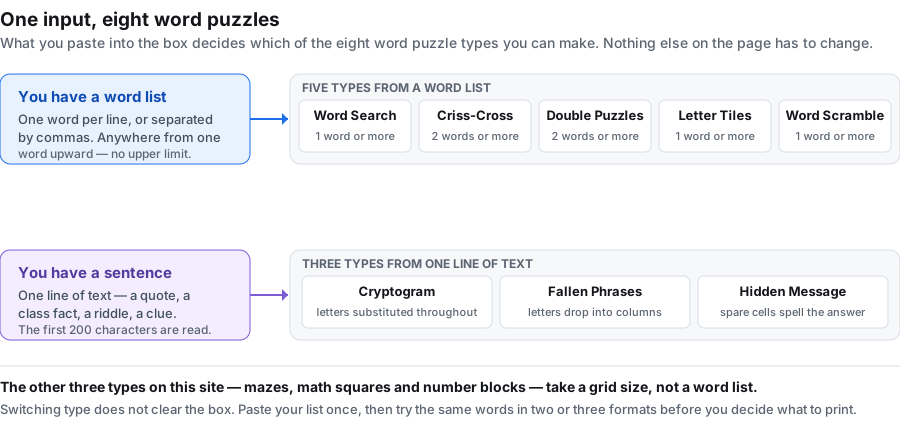
| If you have | You can make | How few entries it works with |
|---|---|---|
| A list of words | Word Search, Criss-Cross, Double Puzzles, Letter Tiles, Word Scramble | 1 word, except criss-cross and double puzzles, which need 2 |
| One sentence or phrase | Cryptogram, Fallen Phrases, Hidden Message | 1 line, up to 200 characters |
| Nothing but a grid size | Mazes, Math Squares, Number Blocks — on the home page generator | no words at all |
The word box is not cleared when you switch type. Paste your list once, then run it through two or three formats and print the one that suits the room.
For the seed side of this, the word puzzle generator page goes through it step by step. And if you are still working out whether this is the tool you want, puzzle maker online separates the three different kinds of tool that phrase covers.
The eight word puzzle types
These are the eight, in the order they appear in the dropdown:
One of those eleven is the criss-cross puzzle maker, which takes the same word list and builds a crossing grid with no clues — useful when you want a fill-in grid rather than a sentence or a hidden message.
For a straight spelling task, the word scramble generator gives each word its own line with the letters mixed up and a ruled line to write the answer on, and it can rebuild the same scramble later from a seed.
One type in that set skips the word list entirely: the maze generator carves its puzzle from a grid size and nothing else, and prints the route on a separate answer page.
If what you have is a sentence rather than a list, the cryptogram maker is the counterpart: it enciphers your sentence letter by letter and prints the whole letter key on its answer page. The fallen phrase puzzle also takes a sentence, but it keeps every letter and drops the columns instead, so the phrase has to be slid back up rather than decoded.
Choosing one: start from the age, not from the type
People pick a word puzzle by name and then discover it is too hard. A faster way is to start from who is solving it.
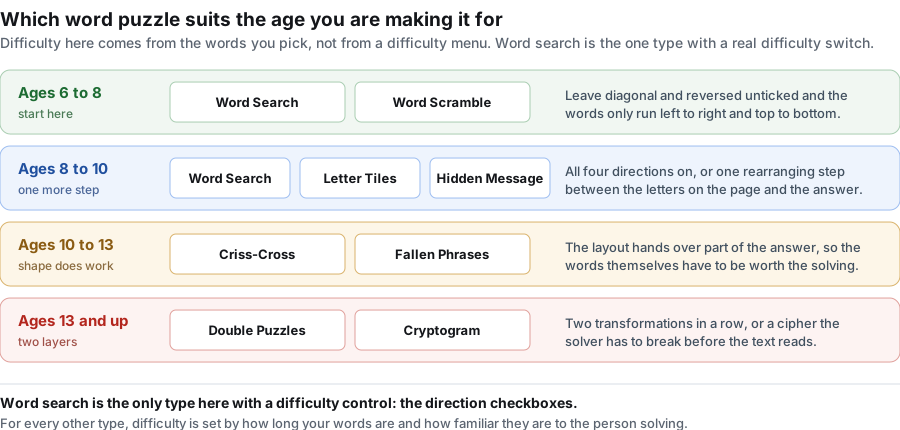
Two things that shift a puzzle along the ladder without changing its type:
- Word length. Ten three-letter words is a different puzzle from ten twelve-letter words, in every type on this page.
- Familiarity. A list the class has already met is a revision puzzle. The same list unseen is a guessing puzzle, and lands one rung harder.
What each setting actually does, by type
The controls vary less than you would expect, and knowing which ones are live saves you pressing the button twice. This is the honest mapping:
| Setting | What it really controls here |
|---|---|
| Grid size | The grid for Word Search, Criss-Cross and Hidden Message, and the line length for a Cryptogram. Double Puzzles, Fallen Phrases, Letter Tiles and Word Scramble lay themselves out from your content and ignore this number. |
| Columns | How many columns the word bank or tile rows are set in. The cap differs by type: 6 for Word Search and Criss-Cross, 4 for Fallen Phrases, 3 for Double Puzzles, and 2 for Letter Tiles and Word Scramble. Ask for more than the cap and you get the cap. |
| Directions | Word Search only. The field hidden for the other seven, because their layouts are fixed. |
| Font size | Live for all eight. Push it to 20 or above for younger readers and low-vision solvers. |
| Seed | Live for all eight. Same seed plus same content rebuilds the same puzzle in any type. |
One thing this maker does not do: it does not write clues. Criss-Cross is an open interlocking grid — your words cross where their letters agree, with nothing written in to prompt the solver. If your content only works once a definition is attached to it, none of the eight types here is the right fit.
One word list, three puzzles: a worked example
Take a ten-word ocean list — OCEAN, CORAL, TIDE, WHALE, SHELL, KELP, REEF, WAVES, ANCHOR, HARBOR — which is what sits in the box when you arrive.
- Word Search with horizontal and vertical only. This is the sheet you hand out. With directions limited to two, a seven-year-old can finish it.
- Word Scramble from the same ten words. The letters of each word are jumbled and the solver writes the word back. Same vocabulary, different skill: spelling rather than scanning.
- Criss-Cross from the same ten words, for the three who finish first. The words have to interlock, so the solver is using the letter overlaps as evidence rather than hunting a straight line.
Three sheets, one paste, about two minutes. Set a seed first and all three are reproducible next term.
When a word will not fit
Word Search and Criss-Cross place your words into a fixed grid, so they are the two types where a word can be refused. When that happens the word is not quietly dropped: a red line under the puzzle title names it, and the word bank lists only what is really in the grid. Raise the grid size, switch more directions on, or shorten the word. The full walkthrough is on the word search generator page.
The other six types size themselves to your content, so a word that does not fit is not a failure mode they have.
Printing and exporting
Both pages are drawn on a 1600 by 2072 pixel sheet in black line work on white, with no background fills to eat toner.
- PNG downloads the sheet at full pixel size, good for dropping into a worksheet document or a slide.
- PDF writes a US Letter page, 612 by 792 points, with the sheet fitted inside half-inch margins — about 210 dots per inch of line work.
- Print sends the page you are looking at to your printer. Switch to the answer tab first if you want the solution on paper.
Your word list never leaves the browser
There is no upload step because there is no upload. The whole maker runs as script in this tab: no request is sent, nothing is written to storage, and there is no account for a list to be attached to. Once the page has loaded you can drop off the network and keep making puzzles, which matters on a locked-down school network. Close the tab and the words are gone.
Frequently asked questions
What is a word puzzle maker?
A page that turns content you supply — usually a list of words — into a finished puzzle you can print. This one makes eight kinds of word puzzle from the same box, and draws an answer page alongside every one.
How many words do I need to make a word puzzle?
One is enough for most types. Criss-Cross and Double Puzzles need at least two. In practice a list of eight to fifteen words makes a sheet that takes a class ten minutes, which is the size most people want.
Which word puzzle is easiest for young children?
Word Search with diagonal and reversed switched off, so words only run left to right and top to bottom. Word Scramble is the other one that works from about six years old. Both are on the bottom rung of the ladder above.
Can I use the same word list for more than one puzzle type?
Yes, and that is the point of the page. The word box is not cleared when you change type. Paste once, then generate the same list as a word search, a scramble and a letter-tile sheet.
Can I make a word puzzle from a sentence instead of a list?
Yes, for three of the eight. Cryptogram, Fallen Phrases and Hidden Message take one line of text — a quote, a class fact, a riddle — and read the first 200 characters.
Can I add clues or definitions to my words?
No. None of the eight types here writes clues. Criss-Cross is an open interlocking grid with no prompts in it. If your words only make sense once a definition is attached, this is not the right tool.
Is this word puzzle maker free?
Yes, and there is nothing to unlock. No account, no credits, no export limit, no watermark, and no cap on how many puzzles you make in a day.
Do I have to sign up?
No. There is no login and no signup anywhere on this page. Open it, paste your words, generate.
Will my class be able to play these online?
No. These puzzles come out as paper — a PNG or a PDF you print. There is no shareable link, no QR code and no scoreboard.
Why is one of my words missing from the puzzle?
In Word Search and Criss-Cross, there was no room for it in the grid. A red line under the title names it. Raise the grid size, switch more directions on, or use a shorter word.
Can I build the same puzzle again next term?
Yes. Put a seed in the seed box before generating and write it down. The same seed with the same words, in the same order, rebuilds the same puzzle — in any of the eight types.
Can I use numbers or two-word entries?
Digits are kept, so R2D2 and 1776 work. For a two-word entry like ICE CREAM, the space is kept in the word bank and removed inside the grid, so solvers look for the letters run together.
Does it work on a phone?
Yes. The controls stack into one column on a narrow screen, and both pages scale to fit. Use the browser's share or print menu for output.
How do I make a word scramble from my list?
Pick Word Scramble from the dropdown, leave the words you want scrambled in the box, and press Generate puzzle. Each word comes back with its letters jumbled in a different order. Set a seed and the same list scrambles the same way next time, which is useful when you want a fresh sheet each class but the same scramble for the answer key.
How do I make a cryptogram from a sentence?
Pick Cryptograms, replace the word list with one line of text — a quote, a sentence, a class motto — and press the button. The first 200 characters are encrypted with a simple substitution cipher and a key is printed underneath so the solver can decode it. Short sentences with clean punctuation work best.
How do I make a word search bigger or harder?
The grid size and direction checkboxes apply to the word search type only. Raise the grid size for a bigger puzzle, tick Diagonal and Reversed for a harder one, and shrink the grid or untick those for an easier one. The other word puzzles (scramble, letter tiles, fallen phrases) size themselves to the content.
How do I make a letter tiles puzzle from my spelling words?
Pick Letter Tiles, paste your spelling list in (one word per line), and press the button. Each word is broken into tiles and dealt out of order for the solver to reassemble. The puzzle page hands out the jumbled tiles; the answer page prints the original words. Set a seed if you want the same tile order next time.
What is a criss-cross puzzle?
A criss-cross puzzle fills a grid with your words so they cross each other, but it has no clues. You supply the word list and the solver places the words into the grid. It looks like a crossword at a glance, but because there are no definitions to solve, it is quicker to build and easier for younger solvers. If you need prompts, a word search or cryptogram is a better fit.
How do I make a criss-cross puzzle?
Set the type to Criss-Cross, type or paste your words (one per line, about 8 to 15 works well), and press the button. The grid is built from your list and you can download or print the puzzle with its filled answer page. Set a seed if you want the same layout again.
How do I make my own puzzle from scratch?
Clear the sample word list, type your own words one per line, pick the puzzle type, and press the button. Start with a short list of 8 to 12 words; the generator builds the puzzle, answer key, and a printable page from that list alone. There is nothing to install and nothing to sign up for.
Can I make a puzzle without installing anything?
Yes. The generator runs in your browser, so you open the page and build the puzzle on the spot. There is no app to download and no software to install; the words you type stay on your device.
Can I make a hidden message puzzle here?
Yes. Pick Hidden Message, replace the word list with one line of text — a quote, a class motto, a riddle — and press the button. Your sentence is tucked into the grid at a fixed interval and the gaps are filled with random letters, so the solver reads every Nth letter, left to right and top to bottom, to recover what you wrote. It is one of the eight word-based types, needs nothing installed, and prints with an answer page that highlights the message.
Do you have a double puzzle maker?
Yes. Double Puzzles takes your word list, cuts each word in half, and hands the solver two shuffled columns — left halves and right halves — to reassemble into whole words. Use words four letters or longer so each half is worth matching. It is one of the eight types on this page, so the same paste-and-print flow and the same seed reproducibility apply.
Can I make a word puzzle in Microsoft Word?
You can draw one there, but Word does not build it for you. In practice that means inserting a table for the grid, typing your words into it letter by letter by hand, filling the empty cells with random letters yourself, and then making a second copy with the answers marked — and every change to the word list means doing it again. A generator does the placement, the filler letters and the answer page in one step, which is the whole reason to use one. If you do want to go the Word route, the fastest version is to generate the puzzle here first and paste the finished grid in as a picture.
How fast can I build a word puzzle?
About as long as it takes to type the words. There is no template to choose, no layout to drag and no file to set up — paste the list, pick a type, press Generate puzzle, and the finished page is on screen with its answer page alongside it. The part that actually costs time is deciding the word list, not using the tool. If you expect to want the same puzzle again, type a seed before you generate; skipping that is the one step people wish they had taken later.