Printable Mazes
A free maze generator: choose a grid size, get a printable maze on one page and the route drawn on a separate answer page. No login, no monthly cap, and an optional seed that rebuilds the same maze later.
Nothing to print yet. Go back to the page, pick a grid size, and press Generate maze. Print again and you will get the maze page, followed by its answer page.
Your maze
Both pages are drawn at print resolution, so the walls stay solid on paper.
What this maze generator actually builds
Most maze tools put an algorithm menu on the page and leave you to guess what the difference is. This one is a single method, and it is worth naming because it decides what you get: the maze is carved by depth-first search with backtracking. The generator starts in one cell, walks to a random neighbour it has not visited, knocks down the wall between the two, and keeps walking. When it reaches a cell with no unvisited neighbour left it backs up to the last junction and tries again, until every cell has been visited.
That produces what maze writers call a perfect maze: there is exactly one route between any two cells. No loops, no sealed-off pockets, no second way around. Two consequences follow, and both matter when you hand the sheet to somebody:
- The exit is always reachable. Because the walk visits every cell, a route from the start to the finish always exists. The tool never prints a maze that cannot be solved.
- A wrong turn always leads back. With no loops, a corridor you enter by mistake ends in a dead end and sends you back. That is what makes the puzzle fair rather than a coin toss.
The route on the answer page is found a different way. Once the walls are set, the generator runs a breadth-first search out from the start cell and stops the moment it reaches the exit. Breadth-first search returns the shortest route, not merely any route — so the line you see on the answer page is the fewest-moves path from S to E.
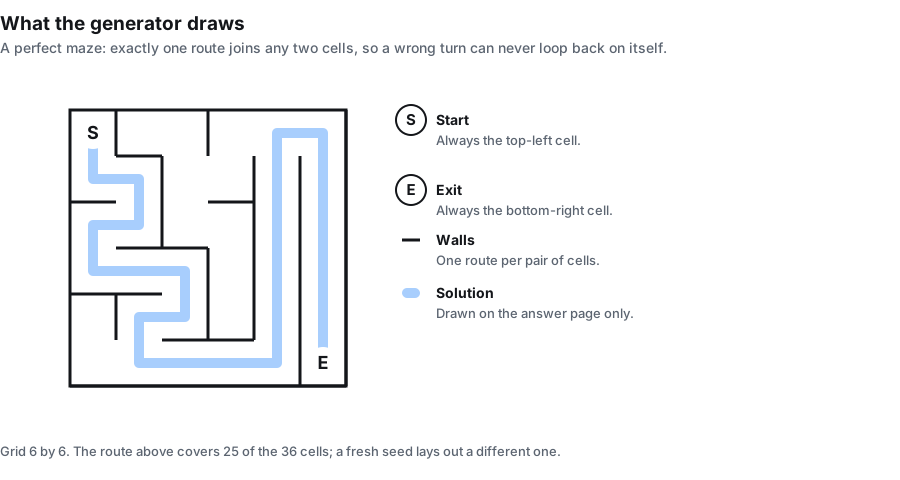
Start and exit are fixed to two corners
The start is always the top-left cell, marked S. The exit is always the bottom-right cell, marked E. There is no setting to move them, and the tool does not open the outer wall to make a doorway on the edge.
That is a deliberate limit rather than an oversight, and it is worth knowing before you compare this page with others: several maze tools let you place the entry and exit on any edge or corner. If a doorway in the middle of the left wall is what your worksheet needs, this generator will not give it to you. What it gives instead is one predictable layout — start top-left, finish bottom-right, every time — which is easier to explain to a class and easier to mark.
Choose a grid size, and what it does to the paper
Grid size runs from 5 to 30, and one number sets both sides. The sheet underneath never changes size: it is always one page, 1600 by 2072 pixels, printed to fill a US Letter sheet. So a bigger grid does not give you a bigger maze — it gives you the same page divided into more, smaller corridors.
The numbers below are measured from the same geometry the tool draws with, not estimated. "Printed cell width" is how wide one corridor comes out in millimetres when the sheet fills a Letter page at half-inch margins, which is exactly what the PDF export does. "Line work" is the share of the maze area that ends up as wall ink.
| Grid size | One cell on the sheet | Printed cell width | Line work in the maze area |
|---|---|---|---|
| 5 × 5 | 284 px | 33.8 mm | 1.05% |
| 8 × 8 | 177 px | 21.1 mm | 1.27% |
| 10 × 10 | 142 px | 16.9 mm | 1.50% |
| 12 × 12 | 118 px | 14.1 mm | 1.77% |
| 15 × 15 | 94 px | 11.2 mm | 2.18% |
| 20 × 20 | 71 px | 8.5 mm | 2.86% |
| 25 × 25 | 56 px | 6.7 mm | 3.61% |
| 30 × 30 | 47 px | 5.6 mm | 4.30% |
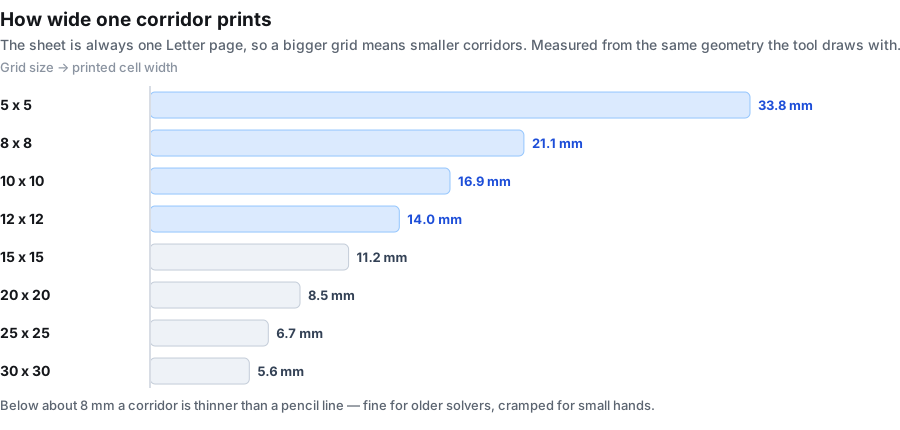
The ceiling is 30, and the tool clamps to it silently. Type 50 into the size box and you get a 30 × 30 maze; type 2 and you get a 5 × 5. The tool does not warn you that it adjusted the number. We checked both ends rather than assuming: a request for 2 produced a page identical to a request for 5, and a request for 50 produced a page identical to a request for 30.
Which grid size to pick
Corridor width is the whole decision, because it decides who can hold a pencil in the gap. A rough ladder that matches the measurements above:
| Who is solving | Grid size | Corridor on paper | What it feels like |
|---|---|---|---|
| Preschool, first mazes | 5 to 8 | 21 to 34 mm | A few big turns. Done in under a minute. |
| Early primary | 8 to 12 | 14 to 21 mm | Real choices, still comfortable for a thick pencil. |
| Upper primary and classroom sheets | 12 to 20 | 8 to 14 mm | The everyday range. Enough dead ends to need a strategy. |
| Teens and adults | 20 to 30 | 5.6 to 8.5 mm | Long, tangled, and slow. Wants a fine pen. |
Two practical notes from the same measurements. First, below roughly 8 mm a corridor is about as wide as the wall line itself, so a maze at 25 or 30 is meant for a pen rather than a crayon. Second, size is not difficulty on its own: a 30 × 30 maze is harder mostly because it is longer, not because each decision is trickier. A 12 × 12 with a deliberately winding route can take longer than a sprawling 25 × 25.
The seed: get the same maze back
Left blank, every press of the button carves a fresh maze. That is what most people want. Filled in, the maze is pinned: type anything into the seed box — a date, a class code, a worksheet number — and the layout is derived from that seed together with the grid size.
Same seed plus same grid size produces the same maze every time. Something like yr4-week3 is enough.
We tested this rather than assuming it: with a seed set and the size fixed, generating twice in a row produces byte-identical maze pages and byte-identical answer pages. Three honest limits on the promise:
- The grid size is part of the recipe. Change from 15 to 20 with the same seed and you get a different maze, not a zoomed version of the old one. Both the walls and the answer route change.
- The seed pins both pages. Because the answer route is derived from the walls, pinning the maze pins the route too. This is the opposite of the site's word scramble tool, where the answer page is just your own word list and the seed cannot touch it.
- A blank seed is genuinely random. Generating twice with the box empty gives two different mazes. If you liked one and did not write the seed down, it is gone — there is no history to go back through.
What this is for: put the seed next to the worksheet title in your plan book, and you can rebuild the exact maze and its answer route months later without keeping the printed copy.
Two pages: the maze and its route
The maze page prints only the walls, the two corner marks, and the title. There is no faint solution line, no start arrow, and no instruction text competing with the puzzle. It is meant to be written on.
The answer page prints the same maze with the route drawn through it as a thick line from S to E. It is a separate page, not an overlay you have to toggle on the printed sheet, so you can hand out the puzzle and keep the key.
Both pages carry the same footer line at the bottom of the sheet and the same "Puzzle page" or "Answer page" label, so a stack of printouts does not get mixed up.
What this maze generator does not do
Being clear about the edges saves you hunting for a setting that is not there. Compared with the maze tools that rank around it, this page deliberately leaves out:
- No shape menu. Every maze is square. There is no circle, triangle, hexagon or diamond layout, and no themed or picture-shaped mazes.
- No moving the start or the exit. They are fixed at the top-left and bottom-right cells, as described above.
- No batch mode. One maze per page, one page per generate. To make thirty mazes you press the button thirty times and print each one.
- No algorithm picker. There is one generation method, not three and not fourteen. The trade-off is that you cannot choose the dead-end character of the maze, only its size.
- No playable version. The maze is for printing, not for solving on screen with the arrow keys. There is no timer and no score.
- No commercial licence document. There is no account, no paywall and no watermark on the output, but the site does not issue a separate written licence either — if you need a signed commercial-use document for a book, this is not the place to get one.
If any of those is the thing you need, a specialised maze tool will serve you better. What is here is one maze type done predictably.
Maze, labyrinth, and what is on this page
The two words get used as if they were the same, and they are not. A labyrinth has a single path that folds back on itself and leads to the centre: there is nothing to decide, because there is only one way to go. A maze branches, and the branches end in dead ends, so the solver has to choose. Every maze this tool draws is the second kind — the depth-first carve always produces junctions and dead ends, never a single winding corridor.
Two related terms you may meet while searching. A maze with no dead ends at all, where every wall can be walked around, is called a braid maze; this tool does not make those. And a maze in which the start and the finish are the same cell is a unicursal or single-path design, which again is the labyrinth idea rather than a maze. This generator produces plain square mazes with dead ends and one route between the two marked corners.
Printing and exporting
Everything is black line work on white, with no background fill to eat toner. Three ways out:
- PNG downloads the sheet at full pixel size, 1600 by 2072, which is handy for dropping the maze into a worksheet document or a slide.
- PDF writes a US Letter page, 612 by 792 points, with the sheet fitted inside half-inch margins. That is the export the millimetre figures in the table above are measured against.
- Print sends the page you are looking at to your printer. Switch to the Answer page tab first if you want the route on paper as well.
Printing in black and white is the default rather than a setting to hunt for, and both pages are drawn at print resolution, so the walls do not break up into grey when they land on paper.
Nothing you type leaves the browser
There is no upload step because there is no upload. The whole generator is script running in this tab: no request is sent, nothing is written to storage, and there is no account for anything to be attached to. Close the tab and the seed you typed is gone.
Two consequences worth knowing. Once the page has loaded you can drop off the network and keep making mazes, which helps on a locked-down school network or a patchy connection. And a seed that encodes a class name, a student's initials or an internal worksheet number never sits on anybody else's machine.
The other puzzles built into the same generator
The same page can build eleven puzzle types; this page simply has the maze selected and the word box switched off, because a maze needs no words. These are all of them:
If you want a puzzle that runs on a word list instead, the word search generator hides words in a letter grid and the word scramble generator prints them jumbled on ruled lines. For words crossing each other with no clues attached, the criss-cross puzzle maker is the nearest thing here. The word puzzle maker page gathers the word-list types in one place, the puzzle maker online page explains which types need a word list and which do not, and the word puzzle generator page covers getting the identical sheet back later from a seed. And if you have a sentence rather than a word list, the cryptogram maker enciphers it and prints the letter key on its answer page.
Frequently asked questions
Is this maze generator free?
Yes, and there is nothing to unlock. No account, no credits, no monthly limit on how many mazes you make, and no watermark on the printed page.
Do I have to sign up?
No. There is no login anywhere on this page. Open it, pick a size, generate. Nothing is saved for you, because nothing is saved anywhere.
What is a maze generator?
A tool that carves a maze for you instead of giving you one somebody else drew. You choose the size, it lays out the walls and marks a start and a finish, and it prints the result. The maze on this page is different every time unless you set a seed.
How does a maze generator work?
This one walks a grid cell by cell, knocking down the wall between the current cell and a random neighbour it has not visited yet, and backing up whenever it runs out of unvisited neighbours. That is depth-first search with backtracking. Because every cell is visited, the result has exactly one route between any two cells.
Is every maze solvable?
Yes. The carve visits every cell, so a route from the start to the exit always exists. The tool cannot print a maze with no way through, and the answer page always has a route to show.
What is a perfect maze?
A maze in which exactly one route connects any two cells: no loops and no isolated areas. The method used here always produces one. In a perfect maze a wrong turn is never wasted forever — it always ends in a dead end that sends you back to the junction.
What grid size should I choose?
Five to eight for preschool and first attempts, eight to twelve for early primary, twelve to twenty for the usual classroom sheet, and twenty to thirty for older solvers who want a long one. The table on this page gives the printed corridor width for each, measured from the drawing geometry.
Can I make a maze bigger than 30 by 30?
No. The size control stops at 30, and typing a larger number gives you a 30 by 30 maze without a warning. The reason is the sheet: it is always one page, so past 30 the corridors would be thinner than the wall lines themselves.
Where does the maze start and finish?
The start is the top-left cell, marked S, and the finish is the bottom-right cell, marked E. They are fixed and there is no setting to move them or to open a doorway on the outer wall.
Can I change where the entrance is?
No. Some maze tools let you place the entry and exit on any edge, but this one keeps them in the two opposite corners so that every sheet has the same layout. If you need an edge doorway, a tool with start and end position controls will suit you better.
Can I get the same maze again next term?
Yes. Put a seed in the seed box before generating and write it down. The same seed with the same grid size rebuilds the same walls and the same answer route. Changing the grid size gives a different maze even with the same seed.
Does the seed change the answer page too?
Yes. The route is worked out from the walls, so pinning the maze pins the route with it. Both pages come back identical when the seed and the grid size match.
How do I get the answer to a maze?
Switch to the Answer page tab above the sheet, or press Answer page on/off. The route is drawn as a thick line from the start mark to the exit mark. Print or download that page separately so you can keep it while the solver gets the maze.
Can I make a maze with more than one route to the exit?
No. The carve used here always produces a perfect maze, which by definition has exactly one route between any two cells. Mazes with extra loops are called braid mazes and this tool does not make them.
Can I make a circular or hexagonal maze?
No. Every maze here is square, set on a grid of cells with right-angled walls. There is no shape menu and no themed or picture-shaped maze.
Can I make several mazes on one page?
No. One maze per page, one page per generate. For a class set, press the button once per sheet and print each one — with the seed box left blank every maze will be different.
Does it work on a phone?
Yes. The controls stack into one column on a narrow screen and the maze scales to fit. Use the browser's share or print menu for output.
Can I play the maze on screen?
No. This is a print-and-write tool. It produces a page rather than an interactive game: there is no arrow-key navigation, no timer and no scoring.
What is the difference between a maze and a labyrinth?
A labyrinth has a single path that leads to the centre with no choices to make. A maze branches, and the branches end in dead ends, so the solver has to decide. Everything this tool draws is a maze.
Can I make printable mazes for adults?
Yes. The tool does not grade by age — the settings you choose decide the difficulty. Adults usually want something longer and tighter, so pick a grid of 20 to 30 and keep the directions default. The printed corridor width runs from about 8.5 millimetres at grid 20 down to 5.6 millimetres at grid 30, which is where the maze stops being easy to trace with a thick pen. If you need something more readable for older readers, a smaller grid or a larger font will help.
Can I make printable mazes for kids?
Yes, and the easiest setting is a small grid. A grid of 5 to 8 gives corridors of 21 to 34 millimetres, which leaves plenty of room for a young child to follow the path with a pencil or crayon. Mazes need no reading at all, so they are the first puzzle type you can hand to children who are still learning to decode text.
Does the printable maze come as a PDF or a PNG?
Both, and they are not the same thing. Download PNG gives you the sheet at 1600 by 2072 pixels, which you can drop into a document or slide. Download PDF gives you a US Letter page with the maze fitted inside half-inch margins, exactly the size the measured tables on this page are based on. If you are printing at home or handing a file to a copy shop, PDF is the one to use.
Can I make free printable mazes for kindergarten?
Yes. A grid of 5 or 6 is about as simple as a maze gets, with corridors wide enough for a small hand to manage. Each maze has exactly one route from the top-left corner to the bottom-right, so there is no guessing and no dead end that sends the solver back to the start. For a whole class set, generate each maze separately with the seed box left blank so no two sheets are the same.
Is this a maze builder or a maze maker?
It is all three. People search for maze generator, maze builder and maze maker and mean the same thing: a page that turns a grid size into a finished printable maze plus its answer page. This page does that — you pick a size, press the button, and get the maze on one page and the route on the next.