Large Print Word Search
Type your words and print a word search with its answer page. The settings below are already at the biggest letters this tool draws. Every measurement on this page was taken off the sheet it produces.
Nothing to print yet. Go back to the page, paste your word list, and press Generate word search. Print again and you will get the puzzle page, followed by its answer page.
Your puzzle
Both pages are drawn at print resolution, so the letters stay sharp on paper.
How big the letters actually print
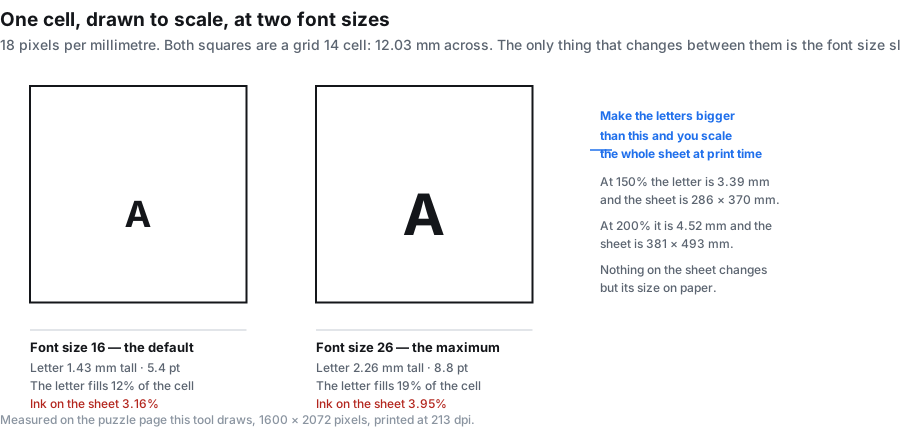
This is the number that decides whether a sheet is usable for someone with low vision, and almost nobody publishes it. So we measured it. A capital letter was counted pixel by pixel on the finished sheet, at every setting of the font slider, with the grid held at 14.
| Font slider | Letter height on paper | Same as type size | Ink on the sheet |
|---|---|---|---|
| 10 | 0.83 mm | 3.4 pt | 2.86% |
| 12 | 1.07 mm | 4.1 pt | 2.94% |
| 14 | 1.19 mm | 4.7 pt | 3.04% |
| 16 (default) | 1.43 mm | 5.4 pt | 3.16% |
| 18 | 1.55 mm | 6.1 pt | 3.33% |
| 20 | 1.79 mm | 6.8 pt | 3.46% |
| 22 | 1.91 mm | 7.4 pt | 3.56% |
| 24 | 2.02 mm | 8.1 pt | 3.67% |
| 26 (maximum) | 2.26 mm | 8.8 pt | 3.95% |
The letter height is the measured height of a capital A, not a nominal type size — a type size is about a third larger than the cap height it produces, which is why the third column is smaller than the first. The sheet is drawn at 1600 by 2072 pixels and printed at 213 dots per inch, so one pixel on the drawing is 0.119 millimetres on paper. Every figure above comes from that conversion, applied to ink counted on the real output.
What this tool cannot do, said plainly
This is not a large print book page, and it cannot be made into one from this page alone. The biggest letter it draws is 2.26 mm tall, which is about 8.8 pt type. A large print edition is set at roughly 16 to 18 pt. If that is what you need, a large print puzzle book will serve you better than this tool, and no amount of adjusting the settings here will close the gap.
What the tool does give you is your own words on a sheet whose letter size you can now predict in millimetres, plus an answer page, plus one route to genuinely bigger letters: scale the sheet up at print time. The artwork is vector-clean line work at 213 dpi, so enlarging it does not blur the edges. Set the font slider to 26 first, then use the scale box in your print dialog:
| Print scale | Letter height | Same as type size | Sheet size on paper |
|---|---|---|---|
| 100% (as drawn) | 2.26 mm | 8.8 pt | 190 × 247 mm · Letter |
| 113% — the most that fits Letter | 2.55 mm | 9.9 pt | 215 × 279 mm · Letter |
| 125% | 2.83 mm | 11.0 pt | 238 × 308 mm · A3 |
| 150% | 3.39 mm | 13.2 pt | 286 × 370 mm · A3 |
| 175% | 3.96 mm | 15.4 pt | 333 × 432 mm · A2 |
| 200% | 4.52 mm | 17.6 pt | 381 × 493 mm · A2 |
At 200% the letters are 17.6 pt, which is the large print range. The catch is on the right-hand column: the sheet grows with the letters, so a scaled-up sheet stops fitting the paper you have. US Letter tops out at about 113%, which buys you 2.55 mm letters — barely more than printing at 100%, so if Letter is all your printer takes, scaling is not the answer. 150% on A3 is the practical sweet spot: 13.2 pt letters on a single sheet of paper, no tiling and no gluing.
The grid size does not change the letter size
This is the part that catches people out, and it is the reason "make the grid smaller" is only half the advice. The font slider sets the letter size. The grid size sets how much room each letter sits in. Change the grid and the cells change; the letters stay exactly the same size on paper. Measured at font size 16, the capital A came out 12 pixels — 1.43 millimetres — on a grid of 5, and the same 1.43 millimetres on a grid of 30.
| Grid size | Cell on paper | Letter at font 16 | Letter fills | Ink on the sheet |
|---|---|---|---|---|
| 5 | 33.81 mm | 1.43 mm | 4% | 1.37% |
| 8 | 21.07 mm | 1.43 mm | 7% | 1.96% |
| 10 | 16.91 mm | 1.43 mm | 8% | 2.34% |
| 12 | 14.05 mm | 1.43 mm | 10% | 2.75% |
| 14 | 12.03 mm | 1.43 mm | 12% | 3.16% |
| 16 | 10.48 mm | 1.43 mm | 14% | 3.62% |
| 20 | 8.45 mm | 1.43 mm | 17% | 4.54% |
| 24 | 7.02 mm | 1.43 mm | 20% | 5.50% |
| 30 | 5.60 mm | 1.43 mm | 26% | 7.04% |
Two things follow from that table, and both are useful. First, a small grid makes a calmer sheet rather than a bigger-lettered one: at grid 5 there are 25 cells to look at instead of 196, so there is far less to scan past. Second, the ink column is driven mostly by the grid, not the font — the sheet goes from 1.37% ink at grid 5 to 7.04% at grid 30, a fivefold difference, while moving the font slider from end to end moves the ink by about one percentage point.
At the largest font size the proportions look like this: on a grid 10 the letter fills 13% of the cell, and on a grid 30 it fills 40%. The denser sheet is the one that looks like an ordinary word search; the sparse one is the one that is easier to scan but looks unusually airy. Neither is wrong — they are different jobs.
How many words fit when the cells are big
A large grid is not just a look; it also costs you words, because every word you add has to be threaded between the others. Each cell below was tested six times with different seeds, using ten five-letter words, horizontal and vertical directions, and the font at 26. The number is how many of the six runs placed every single word.
| Grid size | Cell on paper | Runs that placed all 10 words |
|---|---|---|
| 5 | 33.81 mm | 0 of 6 |
| 6 | 28.10 mm | 0 of 6 |
| 7 | 24.05 mm | 0 of 6 |
| 8 | 21.07 mm | 3 of 6 |
| 9 | 18.69 mm | 6 of 6 |
| 10 | 16.91 mm | 6 of 6 |
| 12 | 14.05 mm | 6 of 6 |
| 14 | 12.03 mm | 6 of 6 |
So the wall is at grid 8. Below that a ten-word list cannot be threaded in reliably, however many times you press the button. Grid 9 is the smallest grid that placed all ten words in every run, and grid 10 gives you the same reliability with a little more breathing room. That is why the box at the top of this page starts at 10.
Going the other way, here is how far a grid 10 and a grid 12 will stretch. Same five-letter words, same six seeds, font at 26.
| Words in the list | Grid 10 (16.91 mm cells) | Grid 12 (14.05 mm cells) |
|---|---|---|
| 8 | 6 of 6 | not tested |
| 10 | 6 of 6 | 6 of 6 |
| 12 | 6 of 6 | 6 of 6 |
| 14 | 2 of 6 | not tested |
| 15 | not tested | 6 of 6 |
| 16 | 0 of 6 | not tested |
Twelve words is the reliable ceiling on a grid 10, and fourteen is where it starts failing. On a grid 12, fifteen words still placed every time. If your list is longer than that, the answer is not a bigger grid — it is fewer words, or a second sheet.
When a word will not fit it is never quietly dropped. A red line under the title names the words that did not make it, and the word bank lists only the words that are really in the grid. A printed sheet never asks a solver to find a word that is not there.
The settings that make a large print sheet
Putting the measurements together, this is the recipe:
- Font size 26. It is the only control that changes the letter size, and 26 is as far as it goes.
- Grid size 10. The smallest grid that reliably takes a ten-word list, which also means the fewest cells to scan past.
- Ten words or fewer, five to eight letters each. Long words force the grid up; short words keep the sheet calm.
- Horizontal and vertical only. Leave diagonal and reversed off. Backwards and diagonal words are the slowest thing to scan for, and they also make placement harder on a small grid.
- Two or three word bank columns, so the list under the grid stays in large type as well.
- Scale at print time if you need more. 150% on A3 gives 13.2 pt letters on one sheet.
That is the sheet this page starts you on: press the button and you get it. If you want the geometry behind the numbers rather than the type size, the printable word search page covers how big the squares print and what the sheet asks of your printer. If you want the same puzzle again next term, the word search generator page covers how the seed pins a layout. And the puzzle maker page takes the same idea further, under the heading about the same puzzle for low vision and younger readers.
What comes up for this search, and what is missing
Worth knowing before you spend ten minutes on a sheet. Of the nine organic results on the first page for this phrase, three are pages selling large print puzzle books, four are libraries of finished puzzles on somebody else's themes, one is a board of links, and one builds a puzzle from something you type. The maker slot is close to empty — and the one occupant's word search page is a stub.
The libraries are good at what they do: you click, you print, you are done. What none of them can do is take your words. A list of the residents on a care home unit, this week's spelling words, the names of a bridge club, a set of vocabulary from a unit that just finished — no library holds any of those, and no library ever will. That is the gap this page fills, and the measurements above are here so you can judge for yourself whether the result is big enough for the person who will be holding it.
Printing settings that matter more than usual
Every sheet is drawn on the same page: the PDF page box is 612 by 792 points with the sheet placed at 540.00 by 699.30 points — 190.5 by 246.7 millimetres — inside 36-point side margins. The artwork is 1600 by 2072 pixels, which is 213 dots per inch.
- Choose "Actual size" or 100% if you are not deliberately scaling. "Fit to page" is what a print dialog calls a small shrink, and a shrink is exactly what you do not want here.
- Leave it on portrait. The sheet is already taller than it is wide.
- If you are scaling up, type the percentage into the scale box rather than using "fit to A3", so the number you get is the number in the table above.
- Print the answer page too. It is drawn at the same settings, so whoever is marking is not squinting at a shrunken key. Switch to the Answer page tab before printing.
- Black and white is fine. The sheet is black line work on white with no fills, and between 1.4% and 4% of it carries ink at these settings.
Word lists that work at this size
Short words are the whole trick. These four lists are all five to eight letters, which keeps the grid small and the sheet calm:
- In the kitchen: KETTLE, SPOON, WHISK, LADLE, APRON, OVEN, PANTRY, TEAPOT, CUP, PLATE
- Garden: ROSE, TULIP, DAISY, SEEDS, WATER, SHOVEL, HEDGE, POT, LEAF, SNAIL
- Weather: CLOUD, RAINY, SUNNY, FROST, BREEZE, STORM, SNOW, WIND, MIST, HAIL
- Around the house: CHAIR, TABLE, LAMP, SHELF, RUG, CLOCK, DOOR, WINDOW, BED, SOAP
Type one word per line. Nothing is uploaded, and nothing is stored — the whole generator runs as script in the tab you are looking at.
The same tool makes ten other puzzles
Your word list feeds every type in the generator, not just this one. These are all eleven, and what each is built from:
The printable puzzles page groups the eleven by what they need from you and gives the ink and file size of each. If a printable sheet that needs no word list at all would suit better, the maze generator page covers what the grid size does to the paper.
Frequently asked questions
What size are the letters in a large print word search?
On this tool, between 0.83 mm and 2.26 mm depending on the font slider — the full table is above. A capital letter 2.26 mm tall is about 8.8 pt type. Large print books are set at roughly 16 to 18 pt, which is 4 to 4.5 mm, so a scaled-up print job is the only way to reach that here.
What font size counts as large print?
For a printed book, large print generally starts around 16 pt and goes up to about 18 pt, with some editions larger. This tool's slider runs from 3.4 pt to 8.8 pt on paper, so it covers ordinary reading sizes rather than the large print range.
How do I make a large print word search?
Type one word per line, set the font slider to 26, set the grid to 10, leave horizontal and vertical on, and press Generate word search. Then print at 100% for an 8.8 pt sheet, or scale to 150% on A3 for a 13.2 pt sheet.
Does the grid size make the letters bigger?
No. Measured at font size 16, the capital letter came out 1.43 mm on a grid of 5 and the same 1.43 mm on a grid of 30. The grid changes the cell — 33.81 mm down to 5.60 mm — and the letter stays put. Lowering the grid makes the sheet easier to scan because there is less to look past, not because the letters grow.
How many words fit on a large print sheet?
Twelve on a grid 10, fifteen on a grid 12, using five-letter words. Grid 8 and below will not reliably take ten words at all — it failed in every run we tried. Grid 9 is the smallest that placed a ten-word list every time.
Which grid size should I use for someone with low vision?
Grid 10 with the font at 26. It is the smallest grid that reliably fits a ten-word list, so the solver has the fewest cells to scan, and the letters are as large as this tool draws them. Then scale the print job if you need more.
Can I make the letters bigger than 2.26 mm?
Not by changing a setting — 26 is the top of the slider. You can scale the sheet up when you print: 150% gives 3.39 mm letters on a 286 × 370 mm sheet, and 200% gives 4.52 mm letters on a 381 × 493 mm sheet. Nothing else about the puzzle changes.
Is this a large print puzzle book?
No, and it is not trying to be one. It is a generator: you supply the words, it draws the sheet. If you want a bound large print puzzle book with type at 16 pt or more, a book is the right purchase, and several of the pages ranking for this phrase sell exactly that.
Is it free, and do I have to sign up?
Free, with no account and no email field anywhere on this page. No watermark, no export cap, and no limit on how many copies you print.
Do the words I type get uploaded?
No. The generator runs entirely in your browser: no request is sent, nothing is written to storage, and there is no account for a list to be attached to. Close the tab and the words are gone.
Does the answer page come at the same size?
Yes. Both pages are drawn together from one layout at the same settings, so the answer page has the same letters and the same grid. Whoever is marking is not reading a shrunken key.
Where can I print a large print word search?
Anywhere there is a printer, but a copy shop is the practical answer if you are scaling to A3 or A2. Download the PDF first and take the file with you — the print dialog there will have the scale box you need.
Can I use it without an internet connection?
Once the page has loaded, yes. Nothing in generating or printing calls a server, so you can drop off the network and keep making sheets.
Why is one of my words missing?
There was no room for it in the grid at that size. A red line under the title names it, and the word bank leaves it out. On a small grid the fix is usually to shorten the word or drop it, rather than to enlarge the grid — a larger grid defeats the point of a large print sheet.
Are word searches good for seniors?
We can only speak to the sheet, not to the health side of it — this page makes puzzles, and it makes no medical or therapeutic claims. What it can do for an older reader is mechanical and measured: the font slider goes to 26, which prints at about 2.26 mm per letter, roughly 8.8 points, and the answer page comes out at the same size so the key is readable too. The grid stays small, so there is less to scan at once, and there is no clock and no score. If 2.26 mm is still too small, the honest answer is that this tool cannot go bigger — the usual way past it is to print the PDF at 150% or 175% scale, which is covered above.
Can I make a poster size word search?
Not in one step. This tool draws one sheet at a fixed size, and the print scale is what makes it bigger: 200% gives letters 4.52 mm tall, about 17.6 pt, on a 381 × 493 mm sheet, which is A2. That is the practical ceiling here. Past A2 you would be asking a copy shop to enlarge the exported PDF, and the trade is resolution — the file is a fixed-size drawing, so every step up spreads the same detail over more paper. If what you want is a wall sheet for a group to work around, print at 200% and accept A2, or run several sheets at 100% and put them up side by side.
Can I make a whole book of these?
Not here — one sheet at a time. Each run produces one puzzle page and its answer page, and there is no batch mode, no book layout, and nothing on this page that paginates or assembles a set. Making a book means generating the sheets one after another and putting them together in whatever you use for layout. The one-sheet-at-a-time design has an upside: every sheet is drawn to its own grid and font settings, so the pages in a set do not have to match each other.